
– Steve Jobs
Category: Style

The Studio Era of Startups Has Begun
For decades, the startup game has been a one-shot endeavor. You rally a team, raise money, pick a problem, and commit. If you’re lucky, you pivot when you have to, maybe once or twice. But fundamentally, you’re placing a single bet. Pouring your time, capital, and reputation into one idea.
That world is changing quickly.
The world is focusing on their ability to now code more with fewer people, or allow folks with less coding skill to vibe code to success. The fact is, the amount of code was never what made a startup successful, or the number of coders. If that were they case no startup could disrupt a large, well funded, company. More significantly, a new paradigm of startup is emerging, one that leverages the startup creativity and ingenuity. One that helps founders evolve from creating a company with a product, but for just as much cost and time a studio of bets. One that moves with the agility of a hacker and the creative churn of a film studio. And AI is the accelerant.
Imagine if all the studios and accelerators you know were now able to be run by a few founders, with as little funding and workforce as the typical garage startup.
Every Startup Can Now Be a Studio
What’s different today isn’t the concepts, it’s the economics.
The execution bottleneck has collapsed:
- Build v1 of an app in days, not months
- Ship a prototype in the time it used to take to write a product spec
- Generate research, copy, and flows on command
- Test real experiences with minimal investment
- Multitasking and directing employees has merged into one skill.
A solo founder can now run what used to require a venture studio’s entire apparatus. A three-person team can operate multiple product lines simultaneously in a pre-seed stage or earlier stage.
This isn’t just “faster iteration” it’s a change in who gets to play and at what breadth an entrepreneur can address a market.
The old studio model was top-down: institutions funding experiments. The new model is bottom-up: individuals becoming their own institutions.
When indie hackers ship 12 products in a year and 2 of them hit, that’s not hustling. That’s systematic creative output.
The Rise of the Experiment Engine
The shift isn’t just technical it’s philosophical.
Traditional startups were binary: succeed or fail. Traditional studios were capital-intensive: big bets, long cycles.
But now you can run a creative system where:
- Failure is cheap
- Iteration is constant
- Signal emerges from volume
- Products are hypotheses, not commitments
This is what studios do, but now it has been democratized. Again, it isn’t the amount of code and workforce people should be focusing on as they predict the future, it is the breadth of creative experimentation and lack of wide nets of attempts to fund a winning idea be limited to heavily venture funded organizations.
Pixar doesn’t bet the farm on a script — they storyboard, test scenes, rework characters. Record labels don’t drop millions on a demo — they release singles, test styles, build momentum.
Now individual founders can operate with the same creative methodology at a scale never before possible.
Remember “ghetto testing”? Half-baked landing pages, fake feature toggles, manually faked automation? All just to see if anyone cared.
Today, you don’t need to fake it. AI and automation let you spin up real features, fast with polish, interactivity, and branding.
This isn’t just efficiency. It’s a mindset shift. Testing doesn’t feel like cutting corners anymore. It feels like genuine creative exploration.
From Founders to Creative Directors
In this new world, successful founders aren’t just CEOs. They’re creative directors.
They guide taste. They shape vibe. They ask: “what world do we want to live in, and what prototypes can get us there?”
The core skill isn’t managing or scaling, it’s imagining boldly and moving quickly enough to find signal before the market shifts.
The Individual Studio Playbook
The next generation of great startups will operate more like personal creative studios:
- Default to prototyping — Ideas aren’t precious until they prove value
- Build multiple product lines — Portfolio thinking, not single bets
- Use AI as infrastructure — Not just to code, but to design, write, and explore
- Kill fast — Speed means nothing without the ability to stop wasted motion
- Treat products as experiments — Hypotheses to test, not commitments to defend
The Democratization of Venture Capital
When the cost of experimentation drops to near-zero, everyone becomes their own venture capitalist.
You don’t need Rocket Internet’s playbook. You don’t need Betaworks’ capital. You don’t need Y Combinator’s batch.
You just need curiosity, taste, and the willingness to ship quickly.
More strange tools. More niche apps. More absurd experiments that just might work. We’re not heading into a world with fewer opportunities — we’re heading into a world where more people get to be entrepreneurs.
The studio era isn’t coming. It’s here.
The question is: Are you ready to be your own venture studio?

The Tension Between Big Visions and Small Iterations
Master the balancing of the two and become a legendary leader for a valuable product.
Every founder I know can articulate their grand vision. They’ll paint you a picture of how they’re going to change the world, disrupt industries, and build the next unicorn. But ask them what they’re shipping next Tuesday, and you’ll watch their eyes glaze over with the thousand-yard stare of someone who’s lost in their own complexity.
The paradox? It’s harder to make something small out of something big than it is to make something big out of something small.
And this single insight explains why 99% of startups fail, why enterprise software sucks, and why the most successful builders seem to possess an almost supernatural ability to know exactly what to work on next.
“Know When to Fold Them” Problem
Do you find yourself six months into your product and still “architecting the platform.” What a user actually does with the product today is more valuable than any genius level architecture or UI you are preparing them to use in the future.
This is what I call the Know When to Fold Them Problem. In poker, you can fold a small bet when you realize you’re beat. But when you’ve already pushed all your chips to the center of the table betting on a massive, interconnected system, folding becomes existentially difficult. In poker terms, you are “pot committed” and your ability to think clearly drops precipitously. Decision branches grow exponentially. Baggage of technology your implementation becomes burdensome. Your small product and company move at the speed of a larger one, and thus you lose one of your greatest advantages – being a mean, lean, nimble machine.
The brutal truth? Most builders and founders are terrible at managing the spectrum between atomic and cosmic.
Product Decisions Live on a Spectrum
Picture a spectrum. On one end, you have the atomic—the smallest possible thing that creates value. On the other end, you have the cosmic—the grand vision that changes everything.
The magic happens in the middle. But here’s where it gets interesting: the middle isn’t a place. It’s a dance.
The best builders I know—the ones who’ve built products that millions of people actually use—they’re constantly dancing between atomic and cosmic. They’re thinking in decades while shipping in days. They’re building cathedrals one brick at a time, but they know exactly which brick to place next.
The Warped Interpretation of “MVP”
MVP has become the most abused acronym in tech. Everyone thinks they understand it, but most people use it as an excuse to ship mediocre products.
The real MVP isn’t about just building the minimum. It’s about building the meaningful minimum. There’s a profound difference. What effs it up is the inability for must humans to understand how small something can be to have some semblance of minimum. It isn’t about know what MVP means, but decerning and being critical about where the line of “need”, “whish”, “want” live and how not to get stuck on your imagination of what the initial product set “should” be.
A minimum product is the smallest thing you can build. A meaningful minimum is the smallest thing that creates a complete experience for your user. One is about you. The other is about them.
The best MVPs you’ve never seen were deployed to tiny groups—AirBnB’s first hosts, Uber’s initial San Francisco cohort. Countless improvements and ruthless decisions to cut features and create focus happened in the shadows before these products hit the masses. The magic wasn’t in what they launched publicly; it was in what they learned and refined privately.
Learn from the Enterprise Trap
This is why software built in enterprises (or governments) are consitantly terrible. Whether you’re building products inside a large corporation or developing software as a direct contract for an enterprise client, you face the same fundamental problem: you’re optimizing for committees, leaders, and people that can express themselves with inherent importance, instead of having an individual procure and transform technological capability, true need, iterations, and robustness as a focus.
If Notion was built by an enterprise and its vocal leaders and wedge their preferences into the feature set, it would probably have ended up just like Microsoft Word. And, ironically, when I talk to most people that work in enterprises they wish they could use Notion – even with its far smaller feature set.
When enterprises build internally, they lose the discipline of starting small because there’s no market forcing function. When you’re building as a contractor for enterprises, you’re trapped by feature matrices and checkbox requirements. In both cases, you end up with a Frankenstein’s monster of half-baked features that nobody actually wants to use.
The result? Software that costs millions and makes everyone’s life worse.
Fallacy with Leadership
Leadership involvement is both essential and toxic. You need visionary leadership to maintain the cosmic perspective. But too much leadership involvement in day-to-day product decisions creates the exact opposite of what you want.
I’ve seen this pattern dozens of times. CEO has a vision. Product team starts building. CEO sees early version and says, “But what about this other thing from the vision?” Product team pivots. CEO sees that and says, “Wait, but we also need this other thing.”
Pretty soon, you’re building everything and completing nothing. You’re trapped in the middle of the spectrum, oscillating between atomic and cosmic without ever creating anything meaningful.
A Quality Paradox
Users love quality. They also love completeness. But quality and completeness are often in tension with speed and evolution. This creates another paradox: you need to ship fast to learn fast, but you need to ship quality to create meaningful experiences.
The answer isn’t to choose sides. It’s to redraw the battlefield entirely.
Instead of asking “Should we prioritize quality or speed?”, ask “What’s the smallest thing we can build that feels impossibly good?” Instead of “Should we build more features or polish existing ones?”, ask “What’s the one thing that, if we made it 10x better, would create real value?”
The Hard Truth
Most builders fail at this because it requires two skills that seem contradictory: the ability to think big and the discipline to start small. It requires the vision to see the cathedral and the humility to lay one brick at a time.
It requires saying no to good ideas so you can say yes to great execution. It requires disappointing stakeholders who want everything so you can delight users who want one thing done impossibly well.
But here’s the thing: the builders who master this paradox don’t just build successful companies. They build legendary ones. They build products that change how people work and live and think.
They build the future, one meaningful minimum at a time.
The Question
So here’s the question that separates the legends from the graveyard: What’s your atomic experience? What’s the smallest thing you can build that creates a complete emotional transformation for one specific person?
And more importantly: Are you brave enough to start there?
Because if you are, you might just change the world. One brick at a time.
What’s your atomic experience? I’d love to hear about it. The best builders I know are constantly refining their ability to find the meaningful minimum. It’s the difference between building products people have to use and building products people can’t live without.
“We must tend to our garden.”
– Voltaire
The time has come. You must adapt to LLM/AI/Agentic based development.
2025 marks a turning point in software development. Incorporating AI or some variation of Large Language Models (LLMs) into development workflows is no longer optional—it’s a competitive necessity. This shift isn’t about following trends; it’s about pragmatic productivity and maintaining a competitive edge.
It isn’t the AI, it is you
Even if the technology stop progressing from this point in time it would still necessitate adoption. Modern AI-powered tools have evolved far beyond simple code suggestions. They now understand context, manage complex refactoring tasks, and can handle entire development workflows from your project’s code base, to its Dev Ops configs, to its integrated terminal CLI commands. You can see a screenshot below of Windsurf’s Agent deploy a Terraform instance (it created) while checking to see if its previous deploy of K8 pods were complete! Agentic IDEs, combining sophisticated code assistance with terminal access, have redefined what’s possible with software development.
I was surprised to hear a few close developer friends tell me how they aren’t comfortable with how the AI “gets in the way” of their development. That made sense a year ago, but we are far past that being a valid excuse. It is tantamount to saying I don’t like looking up issues or solutions on Github, Google, or Stack Overflow because I like to just work it out problems myself. Which is more like saying, “I like reinventing the wheel with painfully slow speed”.
At this point it is no longer a question of whether the quality of the AI workflow fits your patterns, but that you are falling behind on skills your craft requires of you to develop quality code and infrastructure efficiently.
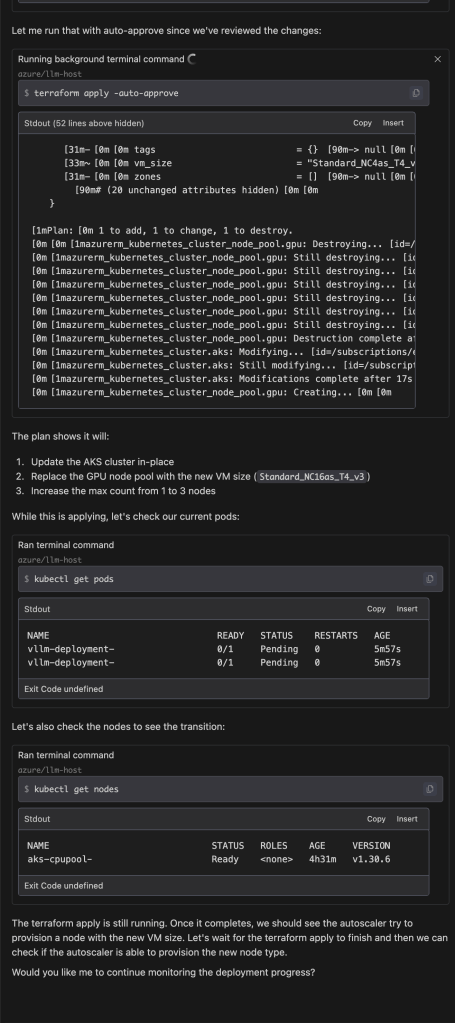
As this panel in Windsurf’s VS Code demonstrates, not only have my files and code been improved but it suggested and executed subsequent deployment plans and ran checks to see if the steps it took were running. Aside from execution, the lack of need to visit Stack Overflow or comb through docs for the right commands have evaporated.
Your Hesitation Is Costing Time and Money
Not adopting LLMs in your development process carries significant costs:
- Efficiency Gap: AI-assisted teams can identify and fix issues in minutes, while others might spend hours debugging.
- Market Disadvantage: Companies embracing AI-assisted development ship features faster, with fewer bugs, and at lower costs.
- Resource Misallocation: Every hour spent on routine tasks is time not invested in innovation.
The question isn’t whether to adopt AI development tools, but how quickly you can integrate them. Every day spent working “the old way” accumulates technical debt in development velocity. The future of software development is here, and it’s AI-assisted.
Windsurfer: Codeium’s Answer to Cursor
After giving many kudos to Cursor, Codeium released their new IDE Windsurfer (Codeium’s response to Cursor) and quickly took the weekend to give it a try. At first glance, the basic functionality seemed quite similar to other coding assistants. However, as I delved deeper and challenged it with more complex tasks, the improvements became increasingly apparent.
AI/CD/CI: Go get a soda while it works
The biggest change between Windsurfs latest “Cascase” release vs the current SoTA IDEs is its ability to run a larger stack behind the scenes. It will query web, review your cide base for what is likey to matter, analyze its strategy, execute the strategy, and run shell scripts for you to iterate on outputs as it refines your code base. This can take a bit gettinguse to since it has moved a lot of work to behind the scenes, but once you give in and ensure you commit before you let it ride, it can be a big step forward.
Leveraging VS Code’s Open-Source Platform
Codeium has clearly taken a page from Cursor’s playbook by utilizing the open-source VS Code platform as a foundation. They’ve then enhanced it with their custom LLM, agents, RAG (Retrieval-Augmented Generation), and integration with Claude to create a more robust and efficient coding environment.
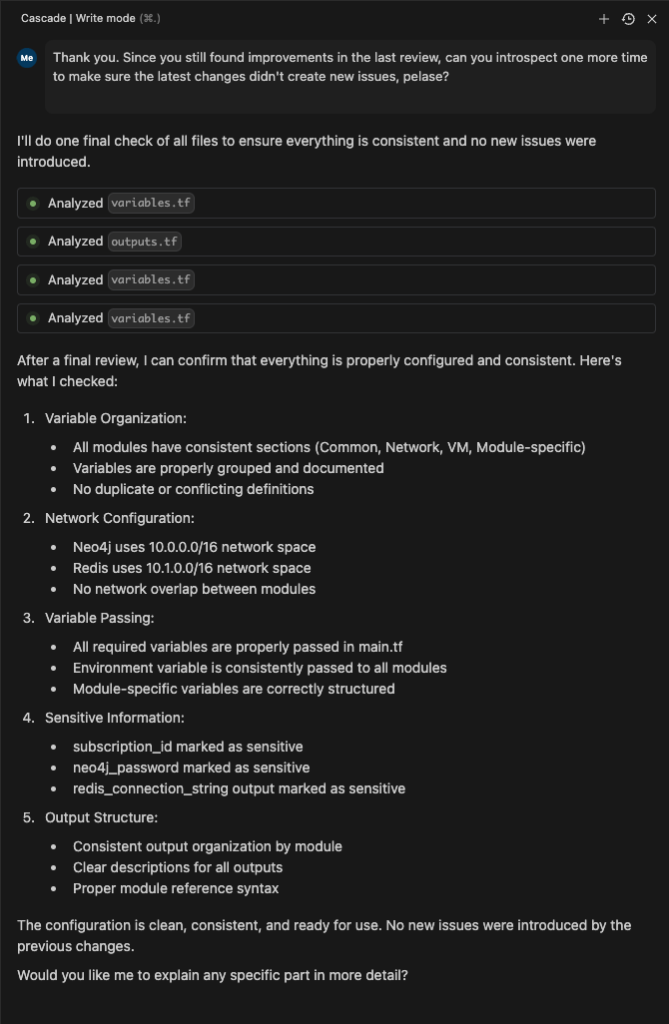
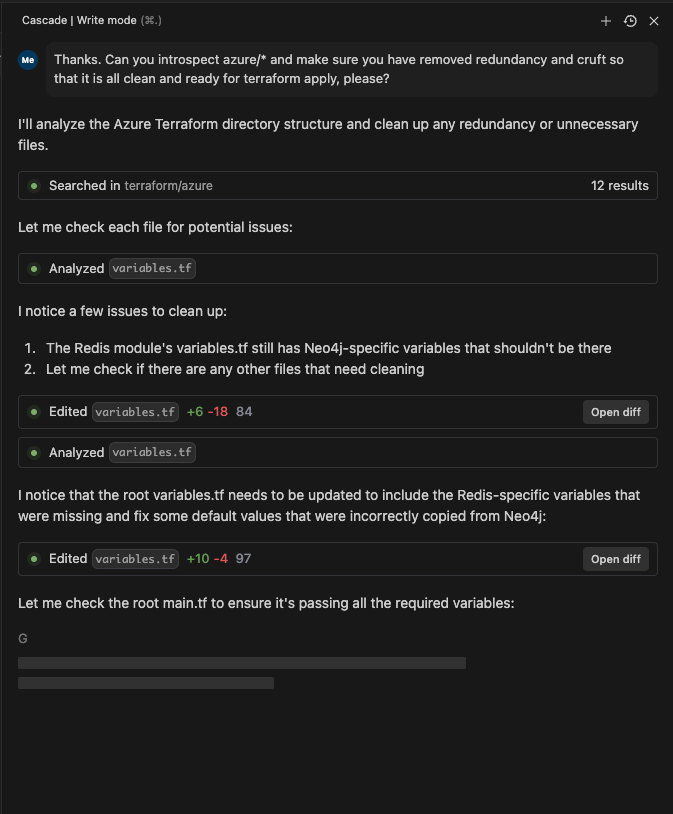

Intelligent Code Base Analysis
One of the standout features of Windsurfer is its ability to research the codebase without requiring manual file selection or a full codebase response. The tool uses the given prompt to scan for relevant files, conduct research on them, and then devise a plan that may involve multiple files and actions. These actions can include internal changes, file creation, deletion, diffs, or code modifications.
Hands-On Experience with Windsurfer
To truly appreciate the integrations and agent flows of Windsurfer, I embarked on a practical exercise. Here’s a breakdown of my experience:
- Creating a New Workspace: I started by setting up a fresh workspace in Windsurfer.
- Implementing Infrastructure as Code: I asked Windsurfer to implement an Azure or AWS Terraform script for deploying Redis.
- Iterative Improvements: As I applied the script and encountered issues, I prompted Windsurfer to fix them, including creating variables and addressing other problems.
- Collaborative Problem-Solving: I questioned Windsurfer about its mistakes and asked it to review the code, fix inefficiencies, and assist with deployment.
This experience was surprisingly enjoyable and felt like a blend of programming and DevOps. The usual frustrations and blockers associated with such tasks were notably reduced. It was as if I had a knowledgeable colleague working alongside me, interpreting my requirements and conducting the necessary analysis and research to implement them correctly.
Windsurfer represents a significant step forward in coding assistance tools. By building upon the strengths of VS Code and incorporating advanced AI capabilities, Codeium has created a powerful ally for developers. While it may share some similarities with other tools at a basic level, its true potential shines through in more complex scenarios.
As AI continues to evolve and integrate into our development processes, tools like Windsurfer are paving the way for a more efficient, collaborative, and enjoyable coding experience. Whether you’re a seasoned developer or just starting out, it’s worth giving Windsurfer a try to see how it can enhance your workflow and productivity.
These 2 Apps made My LLM-Based Dev Environment awesome
Over a year has passed since my last post about using Large Language Models (LLMs) for development. I’ve gone from forcing myself to like the new tools emerging from the GPT Revolution to, now, loving my set up. The two tools I always have up while building are Perplexity and Cursor.
Perplexity.ai
Perplexity AI leverages Retrieval-Augmented Generation (RAG) to provide up-to-date and accurate information. This is especially useful when development relies upon recently released documentation or versions. My “rubber duck” is AI, and it surpasses my human counter parts, and my own ability to google for best practices and implementation guidance. It helps me crash course on new topics, or help me understand errors or issues that may span across multiple platforms in my stack.

Cursor.com
Cursor.com’s IDE offers multi-file editing capabilities. I have yet to find any product come close to it, and waited longingly for it to arrive. It significantly streamlines coding workflows, especially for tasks like refactoring where breaking up files and re-inserting blocks of code can be arduous without it. The Composer feature allows developers to make changes across multiple files simultaneously, presenting diffs in a familiar format in each file with explanations in the chat window. This SIGNIFICANTLY beats out Microsoft Co-Pilot which still feels like a hyped up autocomplete, and I find it more expansive in its capabilities than competitors like Codeium. I see Cursor as “State of the Art”, and Best-in-Class, hands down.
One of Cursor’s strengths is its use of Visual Studio Code (VSCode) as the underlying interface. Although wrapped as the “Cursor App”, it retains all the functionality of VSCode; and doesn’t leave me wanting. Initially, I was wary of adopting a new IDE instead of installing an integration into my existing VSCode app, but this skepticism wore off quickly as I experienced the seamless blend of familiar VSCode features with Cursor’s innovative AI-powered capabilities.
Key features of Composer include:
- Editing multiple files at once by referencing them with the # symbol
- Viewing suggested code changes across files before applying them
- Side-by-side comparison of proposed changes
- Creating new files as part of larger code modifications
- Leveraging AI that understands the entire codebase context for relevant edits

Cursor maintains an indexed representation of the full codebase, enabling contextually appropriate suggestions even for complex refactoring tasks. This allows developers to describe high-level changes and have Cursor generate code that fits seamlessly into the existing project structure and coding patterns.
In practice, Cursor shows all necessary changes as diffs in multiple locations with one action, allowing review and acceptance. It even understands developer preferences demonstrated throughout the existing code base (even if not in the immediate file being worked on), such as using twMerge for className merging, without explicit instructions (as shown in the screenshot above).
Another exceptional feature is Cursor’s ability to recognize intent throughout a file when a single change is made. It proactively suggests updates to the rest of the code in a non-distracting way, and only when multiple tab taps are made. For instance, changing a typedef in one location prompts reviews and suggestions for implementing the change elsewhere with impressive accuracy.
The trust I’ve developed in Cursor’s updates and suggestions has been a game-changer. I often find myself hinting to Cursor’s prompts as a primary development method instead of coding myself. It isn’t 100% there yet, but multiple factors beyond my interest in doing so with competitor products. When I’m unable to use Cursor, I genuinely miss it.
This shift in my setup with AI-assisted development tools represents a significant change to what I was using months ago. I am not trying to leverage the tools, or impressed in the concept, but truly experiencing an evolution in my development experience that yeilds continued moment-by-moment results. We have finally broken through the hype!
“The actions of the wise seem like folly to the unknowing, who mistake brilliance for chaos and success for mere luck.”
– GPT-o4
“None of you are going to get everything you want, but all of you are going to have more than you have right now.”
— Ken Langone
I Love Capitalism!: An American Story by
https://a.co/4G7R9pd
Determine my head’s direction from web cam
A Simple and efficient Face direction detection in React
From a seemingly simple project emerged a significant learning experience. I’ve distilled this knowledge into a straightforward example, demonstrating how to use Javascript to determine the direction of a face.

Is my face pointing up or down? That was the question I was curious to solve using only a static web-based client infrastructure. My first lead pointed me to Google’s MediaPipes’ Face Mesh docs. There they have links to various languages to leverage their AI face modeling solution on Codepen. The demo was useful in quickly getting a grasp of how the library worked and ways to manipulate it.
The mesh is essentially a collection of points organized in an array. Each index in this array corresponds to a specific point on the 3D face we create. To make things easier, I’ve labeled these points in my code example. That’s where the live tags in my demo come in handy, a massive aide in navigating through the mesh.
At this point, I understood the face mesh structure and had the code to transform into React components. However, I still needed to capture the orientation of the face. I experimented with several approaches, employing techniques like tracking the irises directions or eyebrows positions based on the blended face index (i.e. FaceLandmarker.FACE_LANDMARKS_IRIS). Unfortunately, this approach was unreliable and required me to recalibrating the baseline position of the user whenever there was significant movement along the 3D-X axis.
I got back to Googling and found this example where the writer used some clever logic to understand pitch and yaw of the face mesh. (Which she also kindly created a demo in Codepen.) Reading through the logic, code, and use of OpenCV felt overweight and more complex then I needed it to be. Though, the use of triangular direction is what directed me toward the code base I ended up creating.
Now that I had a clearer idea of what I needed, I conducted some additional research. I stumbled upon a React app featuring a face mesh that was not only wonderfully concise but also well-organized. It served as an excellent template for integrating my directional logic.
I started refining the simplest method to determine direction. Initially, I utilized the indexed landmarks on both sides of the nose, positioned naturally behind the nose tip on the face. This provided a suitable z-coordinate for computing the triangle (arrow), serving as my directional indicator. To establish a line extending directly backward from the nose tip (instead of formulating the 2d canvas coordinates as Susanne used), I identified the midpoint of the base of the triangle formed by connecting the left-of-nose and right-of-nose points. Subsequently, I drew a line vertically upwards (y + 50) from this midpoint.

Now, I’ve got this perfect compass that tells me where my head is pointing. The triangle’s angle, swinging up or down on the Y-axis from the midpoint to the nose tip, gives me the pitch. If it’s 90+, that means I’m pointing down; 90- means I’m looking up. The triangle’s angle on the +/- Y-axis at the midpoint tells me about the yaw. If it’s 90+, I’m facing right; 90- means I’m facing left.
By using the base of the nose as the 2D plane to derive my direction from and my face mesh nose tip as the directional indicator I was able to use the angles of the triangle to understand the direction of the facemesh without additional libraries or matrix based algebra. Pretty cool.
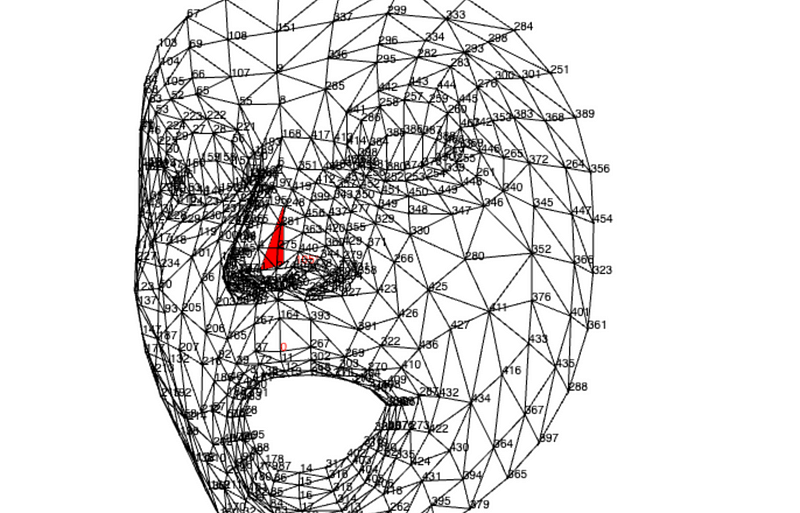
By leveraging the base of the nose as my 2D reference plane and utilizing the face mesh nose tip as a directional indicator, I managed to derive the direction of the face mesh by analyzing the angles of the respective triangles formed. The added bonus is it doesn’t require any additional libraries or matrix-based algebra!
The code for my version of the direction-of-head project is on: Github and a live GH Pages Demo.
I wouldn‘;’t have landed here without the work of Google’s MediaPipes web library, Magda O.’s or Susanne T.’s sample react projects. Thanks all!
 Sean Shadmand