Windsurfer: Codeium’s Answer to Cursor

After giving many kudos to Cursor, Codeium released their new IDE Windsurfer (Codeium’s response to Cursor) and quickly took the weekend to give it a try. At first glance, the basic functionality seemed quite similar to other coding assistants. However, as I delved deeper and challenged it with more complex tasks, the improvements became increasingly apparent.

AI/CD/CI: Go get a soda while it works

The biggest change between Windsurfs latest “Cascase” release vs the current SoTA IDEs is its ability to run a larger stack behind the scenes. It will query web, review your cide base for what is likey to matter, analyze its strategy, execute the strategy, and run shell scripts for you to iterate on outputs as it refines your code base. This can take a bit gettinguse to since it has moved a lot of work to behind the scenes, but once you give in and ensure you commit before you let it ride, it can be a big step forward.

Leveraging VS Code’s Open-Source Platform

Codeium has clearly taken a page from Cursor’s playbook by utilizing the open-source VS Code platform as a foundation. They’ve then enhanced it with their custom LLM, agents, RAG (Retrieval-Augmented Generation), and integration with Claude to create a more robust and efficient coding environment.
Intelligent Code Base Analysis

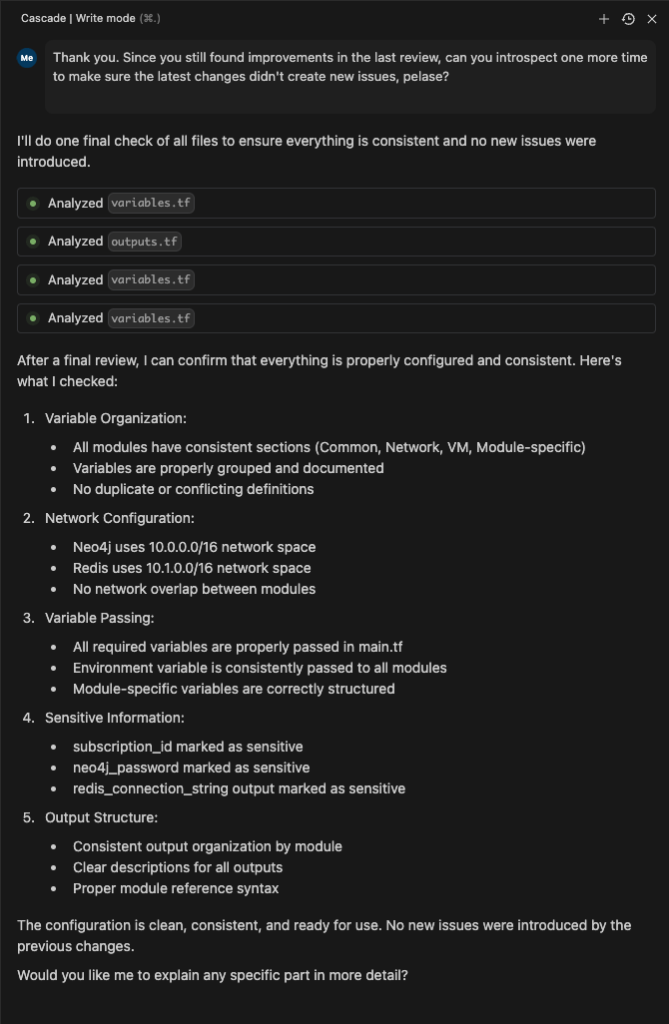
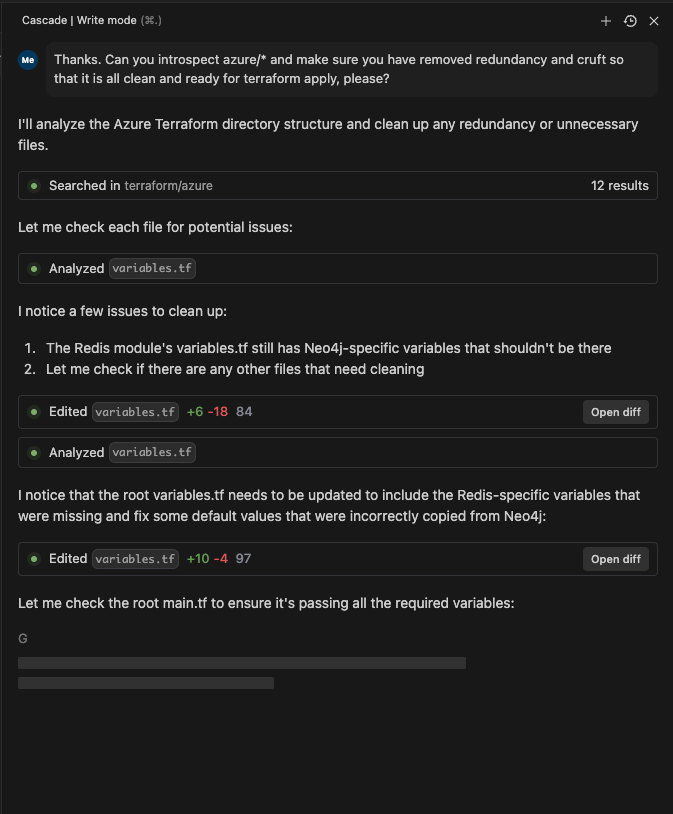
One of the standout features of Windsurfer is its ability to research the codebase without requiring manual file selection or a full codebase response. The tool uses the given prompt to scan for relevant files, conduct research on them, and then devise a plan that may involve multiple files and actions. These actions can include internal changes, file creation, deletion, diffs, or code modifications.

Hands-On Experience with Windsurfer

To truly appreciate the integrations and agent flows of Windsurfer, I embarked on a practical exercise. Here’s a breakdown of my experience:

  1. Creating a New Workspace: I started by setting up a fresh workspace in Windsurfer.
  2. Implementing Infrastructure as Code: I asked Windsurfer to implement an Azure or AWS Terraform script for deploying Redis.
  3. Iterative Improvements: As I applied the script and encountered issues, I prompted Windsurfer to fix them, including creating variables and addressing other problems.
  4. Collaborative Problem-Solving: I questioned Windsurfer about its mistakes and asked it to review the code, fix inefficiencies, and assist with deployment.

This experience was surprisingly enjoyable and felt like a blend of programming and DevOps. The usual frustrations and blockers associated with such tasks were notably reduced. It was as if I had a knowledgeable colleague working alongside me, interpreting my requirements and conducting the necessary analysis and research to implement them correctly.

Windsurfer represents a significant step forward in coding assistance tools. By building upon the strengths of VS Code and incorporating advanced AI capabilities, Codeium has created a powerful ally for developers. While it may share some similarities with other tools at a basic level, its true potential shines through in more complex scenarios.

As AI continues to evolve and integrate into our development processes, tools like Windsurfer are paving the way for a more efficient, collaborative, and enjoyable coding experience. Whether you’re a seasoned developer or just starting out, it’s worth giving Windsurfer a try to see how it can enhance your workflow and productivity.

These 2 Apps made My LLM-Based Dev Environment awesome

Over a year has passed since my last post about using Large Language Models (LLMs) for development. I’ve gone from forcing myself to like the new tools emerging from the GPT Revolution to, now, loving my set up. The two tools I always have up while building are Perplexity and Cursor.

Perplexity.ai

Perplexity AI leverages Retrieval-Augmented Generation (RAG) to provide up-to-date and accurate information. This is especially useful when development relies upon recently released documentation or versions. My “rubber duck” is AI, and it surpasses my human counter parts, and my own ability to google for best practices and implementation guidance. It helps me crash course on new topics, or help me understand errors or issues that may span across multiple platforms in my stack.

Cursor.com

Cursor.com’s IDE offers multi-file editing capabilities. I have yet to find any product come close to it, and waited longingly for it to arrive. It significantly streamlines coding workflows, especially for tasks like refactoring where breaking up files and re-inserting blocks of code can be arduous without it. The Composer feature allows developers to make changes across multiple files simultaneously, presenting diffs in a familiar format in each file with explanations in the chat window. This SIGNIFICANTLY beats out Microsoft Co-Pilot which still feels like a hyped up autocomplete, and I find it more expansive in its capabilities than competitors like Codeium. I see Cursor as “State of the Art”, and Best-in-Class, hands down.

One of Cursor’s strengths is its use of Visual Studio Code (VSCode) as the underlying interface. Although wrapped as the “Cursor App”, it retains all the functionality of VSCode; and doesn’t leave me wanting. Initially, I was wary of adopting a new IDE instead of installing an integration into my existing VSCode app, but this skepticism wore off quickly as I experienced the seamless blend of familiar VSCode features with Cursor’s innovative AI-powered capabilities.

Key features of Composer include:

  • Editing multiple files at once by referencing them with the # symbol
  • Viewing suggested code changes across files before applying them
  • Side-by-side comparison of proposed changes
  • Creating new files as part of larger code modifications
  • Leveraging AI that understands the entire codebase context for relevant edits

Cursor maintains an indexed representation of the full codebase, enabling contextually appropriate suggestions even for complex refactoring tasks. This allows developers to describe high-level changes and have Cursor generate code that fits seamlessly into the existing project structure and coding patterns.

In practice, Cursor shows all necessary changes as diffs in multiple locations with one action, allowing review and acceptance. It even understands developer preferences demonstrated throughout the existing code base (even if not in the immediate file being worked on), such as using twMerge for className merging, without explicit instructions (as shown in the screenshot above).

Another exceptional feature is Cursor’s ability to recognize intent throughout a file when a single change is made. It proactively suggests updates to the rest of the code in a non-distracting way, and only when multiple tab taps are made. For instance, changing a typedef in one location prompts reviews and suggestions for implementing the change elsewhere with impressive accuracy.

The trust I’ve developed in Cursor’s updates and suggestions has been a game-changer. I often find myself hinting to Cursor’s prompts as a primary development method instead of coding myself. It isn’t 100% there yet, but multiple factors beyond my interest in doing so with competitor products. When I’m unable to use Cursor, I genuinely miss it.

This shift in my setup with AI-assisted development tools represents a significant change to what I was using months ago. I am not trying to leverage the tools, or impressed in the concept, but truly experiencing an evolution in my development experience that yeilds continued moment-by-moment results. We have finally broken through the hype!


More tips for early stage startups

Key Strategies for Startups: Control Your Tech, Move Fast, and Value Equity

If you’re a tech company, don’t outsource your core tech to another firm.

Think of your core tech as the heart of your company. It’s what sets you apart and drives your unique value. When you outsource this vital part, you risk losing control and potentially building something unnecessary as you adapt to feedback. No matter how loyal and supportive an outsourcing firm may seem, their primary goal is to grow their own business, not yours. Even if you offer them equity, their interests won’t fully align with yours—they are billing by the hour while you’re focused on trimming down for an MVP.

I’ve seen many bootstrapped firms spend hundreds of thousands of dollars, only to end up with an unfinished product they don’t fully understand. By keeping your core tech in-house, you stay agile, protect your intellectual property, ensure everything aligns perfectly with your vision and goals, and invest in your corporate tech culture.

You’re supposed to be a fast, nimble startup. Being stealthy will more often hold you back than set you up for a “blowout” go-to-market strategy.

You are building your startup because something is missing from the market. This inherently means it has yet to be addressed or addressed successfully. Either you will be the one to succeed where others have failed, or you won’t. Rarely does a large firm, which is not already chasing the market you are attacking, suddenly “steal your idea”. Large firms are slow-moving and full of bureaucracy. They have not innovated because their goal is to preserve their brand and existing income streams. If they did “steal your idea” chances are they would do a horrible job. More importantly, if you can’t do better than what they attempt, what’s your “x-factor”?

More likely, those large companies will become one of your investors or try to acquire your business and novel expertise. Why would they risk building a new department or team internally (and potentially fail – bad for the brand) when they can simply buy it after it has proven successful? If you’re still not convinced and think a few months to a year of stealthiness will prevent another company from copying you, consider this: if it were possible to copy you so easily, would you really have a chance of succeeding in the long term anyway?

As a startup, your biggest strengths are your speed, focus, talent, and flexibility. Large companies aren’t built for these advantages. Staying in stealth mode might seem like a smart strategy to build suspense or keep others in the dark, but it will slow you down and limit your options. Early feedback from customers, investors, and the market is invaluable for refining your product and strategy. By staying too secretive, you miss out on crucial insights and an opportunity to build relationships. Instead, embrace openness—engage with your market, gather feedback, and iterate quickly.

You aren’t bootstrapping well if you are paying others cash to do your core work. Your equity is even more precious and should motivate value, knowledge, and culture.

Bootstrapping is all about making the most of your resources. If you’re spending cash on tasks you could handle internally, you’re not bootstrapping effectively. Instead, consider using options to attract and motivate talent who are passionate about your mission. This not only saves cash but also builds upon your value with equity while creating a committed team culture that’s deeply invested in the company’s success. Equity can be a powerful tool when focused on building long-term value. Remember, your cash is limited. Equity will be the foundational element for future rounds, when used wisely it can drive long-term value and loyalty.

You may not yet be a venture business

It’s exciting to think about raising money, but venture is meant to fuel powerful growth and value. If you already have paying customers lined up, and those sales or design partners could lead to changes in the product you may be giving up equity for the wrong business. If you need money to pay for the time between invoices and payments consider debt financing to cover your float. This isn’t always the most exciting feedback to hear, but if you haven’t considered these tactics then you may be doing a disservice to your business’s ability to evolve properly.

Determine my head’s direction from web cam

A Simple and efficient Face direction detection in React

From a seemingly simple project emerged a significant learning experience. I’ve distilled this knowledge into a straightforward example, demonstrating how to use Javascript to determine the direction of a face.

layers of face mapping and direction detection

Is my face pointing up or down? That was the question I was curious to solve using only a static web-based client infrastructure. My first lead pointed me to Google’s MediaPipes’ Face Mesh docs. There they have links to various languages to leverage their AI face modeling solution on Codepen. The demo was useful in quickly getting a grasp of how the library worked and ways to manipulate it.

The mesh is essentially a collection of points organized in an array. Each index in this array corresponds to a specific point on the 3D face we create. To make things easier, I’ve labeled these points in my code example. That’s where the live tags in my demo come in handy, a massive aide in navigating through the mesh.

At this point, I understood the face mesh structure and had the code to transform into React components. However, I still needed to capture the orientation of the face. I experimented with several approaches, employing techniques like tracking the irises directions or eyebrows positions based on the blended face index (i.e. FaceLandmarker.FACE_LANDMARKS_IRIS). Unfortunately, this approach was unreliable and required me to recalibrating the baseline position of the user whenever there was significant movement along the 3D-X axis.

I got back to Googling and found this example where the writer used some clever logic to understand pitch and yaw of the face mesh. (Which she also kindly created a demo in Codepen.) Reading through the logic, code, and use of OpenCV felt overweight and more complex then I needed it to be. Though, the use of triangular direction is what directed me toward the code base I ended up creating.

Now that I had a clearer idea of what I needed, I conducted some additional research. I stumbled upon a React app featuring a face mesh that was not only wonderfully concise but also well-organized. It served as an excellent template for integrating my directional logic.

I started refining the simplest method to determine direction. Initially, I utilized the indexed landmarks on both sides of the nose, positioned naturally behind the nose tip on the face. This provided a suitable z-coordinate for computing the triangle (arrow), serving as my directional indicator. To establish a line extending directly backward from the nose tip (instead of formulating the 2d canvas coordinates as Susanne used), I identified the midpoint of the base of the triangle formed by connecting the left-of-nose and right-of-nose points. Subsequently, I drew a line vertically upwards (y + 50) from this midpoint.

triangle and angle created based on left and right base of nose and nose tip

Now, I’ve got this perfect compass that tells me where my head is pointing. The triangle’s angle, swinging up or down on the Y-axis from the midpoint to the nose tip, gives me the pitch. If it’s 90+, that means I’m pointing down; 90- means I’m looking up. The triangle’s angle on the +/- Y-axis at the midpoint tells me about the yaw. If it’s 90+, I’m facing right; 90- means I’m facing left.

By using the base of the nose as the 2D plane to derive my direction from and my face mesh nose tip as the directional indicator I was able to use the angles of the triangle to understand the direction of the facemesh without additional libraries or matrix based algebra. Pretty cool.

By leveraging the base of the nose as my 2D reference plane and utilizing the face mesh nose tip as a directional indicator, I managed to derive the direction of the face mesh by analyzing the angles of the respective triangles formed. The added bonus is it doesn’t require any additional libraries or matrix-based algebra!

The code for my version of the direction-of-head project is on: Github and a live GH Pages Demo.

I wouldn‘;’t have landed here without the work of Google’s MediaPipes web library, Magda O.’s or Susanne T.’s sample react projects. Thanks all!

Updated Review of LLM Based Development

I tried developing using GPT mid-2022. While I was amazed by the potential, I was not impressed enough to add it to my daily development workflow. It fell off my radar as a development tool, outpaced by a far more impactful use of text generation and image creation. A toolset that has significantly changed my day-to-day productivity.

Recently, a group of peers convinced me to give coding with LLM another shot. They loved using A.I. to develop code in languages they were not comfortable with. Or, as a manager, a way to better explain what they wanted to see in a project from their team. What convinced me to try it again was their highlighting of how well the results were formatted, syntactically correct, and well documented from the get-go. While they admitted the development of code may not be faster, the prospect of all those benefits culminating into a cleaner, well formatted final product convinced me to develop with GPT again in earnest.

I began my reexamination of the tooling via demos, as we often do. I was very impressed. I converted code into PowerShell (which I don’t know well) and re-created functionality I came across in weeks prior. I was so impressed, I showed my team examples of how the work they completed in the past could’ve been done with the help of GPT instead.

After those successes, I committed to using GPT to develop. Over the next few weeks I made sure to use it on projects I was working on.

While the technology showed incredible advancements since I tried it last year, it still hasn’t become my go-to in the same way using ChatGPT has for writing content.

Here are some areas I was both impressed with but left wanting:

  1. Code completion
    • Pro: Impressive. The look-ahead came in handy similarly to code-completion functionality of the past, with the added benefit of more contextual relevance that was not just a “cookie cutter” snippet.
    • Con: It gave me a useless hint quite a bit and I found myself typing almost as much as before with the incumbent “dumb completion”. I think it is because my mind is moving ahead to what I want the code to do, not necessarily what it is doing on the console at the moment. In the end, it is using patterns to make predictions. So, any new code that is a result of changes to my approach, or my on-the-fly reworking to fix a bug (that was not due to syntax issues) took as much time to develop as non-GPT-based code completion.
  2. Testing
    • Pro: When it comes to testing an existing application, the A.I. hits it out of the park. Ask it to “write a test for myFunction() using Jest” it creates an awesome base test case that I would have hated to write for each function.
    • Con: Some of the same issues outlined in the “Code Completion” and Functional Development” can be problematic here. It doesn’t always create a great test for code I haven’t written yet. (i.e. TDD) However, if the code is already there, it uses that context I’ve provided and its LLM to unpack what it the function is suppose to do and generate all the mocks and assertions needed to create a well written unit test.
  3. Functional Development
    • Pro: Much like helping me get past the dreaded blank page in text generation, I found it more useful than Google searches and StackOverflow reviews to develop a series of functions I wanted, without developing entirely from scratch. Better than code snippets, the snippets A.I. gave were pre-filled based on my prompts, variables, and existing object definitions. That was appreciated. I didn’t have to review the documentation to tweeze out the result I wanted. The A.I. pulled it all together for me.
      Additionally, the fact that it almost always has an answer goes under appreciated in other reviews I’ve read. The part that makes it so advanced, is it fills in a lot of grey area even if I (as a stupid human) carelessly leave out an instruction that is critical in generating a solution. If I were to get the response, “could not understand your request” due to my laziness, I would never use it. The assumptions it makes are close enough to my intent that I am either using the solution, learn a new path, or see what my explanation is missing so I can improve how I communicate with it.
    • Con: The end result did not work out of the gate most of the time. Sometimes it never got it correct and I had to Google the documentation to figure the issue. This was due to what I think was more than one documentation existing for various versions of the library I was using. I’m not sure. While the syntax was correct, the parameters it assumed I needed, or the way the calls were made to interface with a library/API led to errors.
  4. Debugging
    • Pro: Per the “functional development” points above, I was impressed at how I could respond to a prompt result with “I got this error when using the code above: [error]”. It recognized where it went wrong, and attempted to rewrite the code based on that feedback.
    • Con: Each response had a different result than the original. So, instead of fixing what I found was wrong (like a param missing) it also added or removed other features from the code that were correct. This made the generated result difficult to utilize. In some cases, it could never understand the issue well enough to generate working code.

One limitation I am not too surprised about, and am hopeful to see evolve in the future, is the AI’s understanding of a project in its entirety. Done so in a way that context is used in its function creation, making the solutions it provides “full stack”. Imagine a Serverless.com config, for an AWS deployment, that generates files and code that creates and deploys workflows using Lambda, DynamoDB, S3 and so on, all being developed based on prompts. With the yearly (and more recently) weekly leaps, I don’t think we are to far away.

As of today, I find myself going to GPT when filling in starter templates for a new project. I find it’s a much better starting point than starting from cookie cutter function as I set up my core, early, “re-inventing the wheel”-type, skeleton.

For example, I will use a Gitlab template for my infrastructure (be it GL Pages, Serverless, React, nodejs or Python and on and on), then fill in the starter code an tests via a few GPT prompts, and copying them over. Beyond that copy, I find myself detaching from GPT for the most part, and returning to occasionally “rubber duck” new framework functions.

Examples referenced above

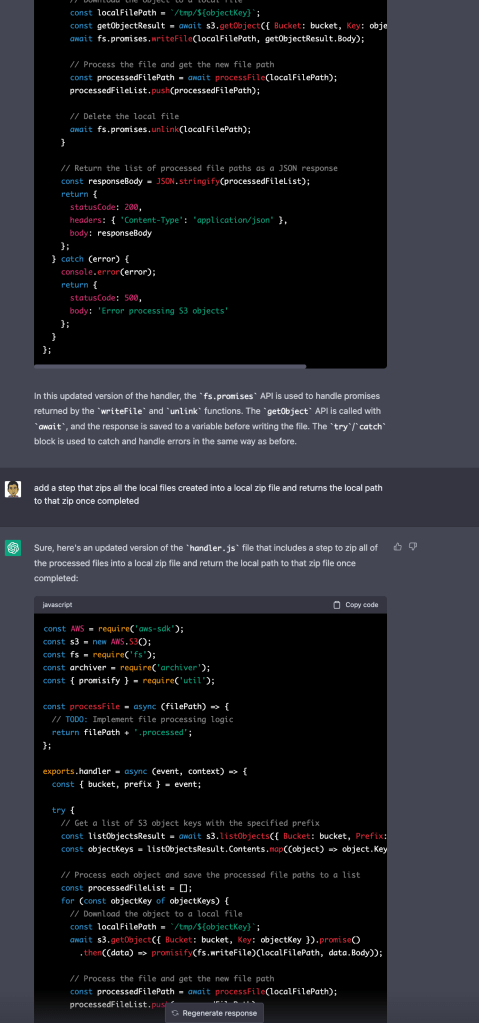
Here I asked for a non-3rd-party use of promises (only await/async) which worked. Then I asked to modify the code by adding a zip task, and it re-introduced the promisify utility when it added the zip process.