How to make free calls home from around the world

Wouldn’t it be nice to make free calls to your home country from anywhere in the world? How great would it be if friends and family at home could call you for free while you travel? Sure you can use Skype or Viber to make internet calls, but with them everyone needs to use the same service; it won’t work well when calling a business or landline. With the method below you can call any phone number directly, be it a home phone, cell phone or app. To do it all you need is a Google Account, a phone number with your local “home” area code (only initially,) and a computer with an Internet connection.

Here’s how to do it:

  1. Sign up for a Google Voice number in your home country before you leave.
  2. Google will provide you a new local number called your “Google Voice Number.”
  3. “Link” your GVoice number to an existing landline or cell number to complete the registration. Note: You can only have one GVoice number for every landline or cell phone you have.

 Your new GVoice number will charge you for “international calls” made to area codes outside your designated GVoice’s area code, BUT it will consider any call to the same GVoice area code a “free call” – no matter where in the world you call from! See screenshots and captions below. 

In addition to the free calls, you will have voicemail that includes a free automatic transcription service, allowing you to read your voicemail messages. You will also have the ability to send and receive texts. Another great option is to use the Hangouts app. Using it you can make internet based calls to other Hangout user AND direct to local phone numbers from your phone.

For travelers this feature gives you an amazing way to stay connected to family and friends at home while using a local number they can call for free as well!

Like to travel? Yup. There’s a gene for that.

14381860924_p0_v2_s260x420Every time you see a story like this you can’t help but think about Ethan Hawk in Gattaca. Our lives, actions and – self – broken down into a perfectly predictable set of genes we can architect for birth.

Elite Daily recently reported the discovery of a gene identified as DRD4-7R ,dubbed the “wanderlust gene”, that gets us yet another step closer.

You can read more about the findings of the Genetic Basis to a Globetrotting Fanatic here. It explains how the gene is carried by an approximately 20% of the human population and is linked to restlessness and curiosity.

Here’s a fun question, if we ever were able to gain complete control of our genetic make-up would you choose to have the Travel Gene?

wanderlust-large-msg-132647107444


Facebook JS login on Chrome iOS workaround

I was putting together a Facebook JS SDK based login on a site I’m working on – only to find that Chrome on iOS does not support the action.

What was even more surprising was the lack of documentation or support online (with Chrome or Facebook) to help work around the issue.

I saw a few suggestion that had solutions based on using Parse or where others suggested using a backend based login API. I didn’t want to install another framework just to solve this problem, and my objective for the interface was to offer a seamless login process that doesn’t interrupt the user’s current modal based workflow.

To make matters worst, and I am really disappointed in Google for this (which is rare,) popping out windows on Google Chrome iOS makes a null reference to the  “opener” in certain situations. This makes it hard to complete a seamless login between two windows once the FB auth page is verified.

Below is a solution that checks if FB is authed, if not, manually opens an FB auth window that forwards the user to an Opener Handler page. That page forces a refresh of the openers auth tokens and closes the window. Once completed the user is sent back to the original page (with no page refresh) and can now proceed with a validated FB auth.

var ABSOLUTE_URI = "http://yourpage.com/openerhandler.html";
var FB_ID = "123456778";
function openFBLoginDialogManually(){
// Open your auth window containing FB auth page
// with forward URL to your Opened Window handler page (below)
var redirect_uri = "&redirect_uri=" + ABSOLUTE_URI + "fbjscomplete";
var scope = "&scope=public_profile,email,user_friends";
var url = "https://www.facebook.com/dialog/oauth?client_id=" + FB_ID + redirect_uri + scope;
// notice the lack of other param in window.open
// for some reason the opener is set to null
// and the opened window can NOT reference it
// if params are passed. #Chrome iOS Bug
window.open(url);
}
function fbCompleteLogin(){
FB.getLoginStatus(function(response) {
// Calling this with the extra setting "true" forces
// a non-cached request and updates the FB cache.
// Since the auth login elsewhere validated the user
// this update will now asyncronously mark the user as authed
}, true);
}
function requireLogin(callback){
FB.getLoginStatus(function(response) {
if (response.status != "connected"){
showLogin();
}else{
checkAuth(response.authResponse.accessToken, response.authResponse.userID, function(success){
// Check FB tokens against your API to make sure user is valid
});
}
});
}
view raw FB JS Auth hosted with ❤ by GitHub
<html>
<head>
<script type="text/javascript">
function handleAuth(){
// once the window is open
window.opener.fbCompleteLogin();
window.close();
}
</script>
<body onload="handleAuth();">
<p>. . . </p>
</body>
</head>
</html>
view raw Opened Window hosted with ❤ by GitHub

Built-in Dictation on Yosemite

What I dictated – as is and untouched:

It’s been a while since I had tried using dictation mostly because it’s never worked before I don’t know how long maps habitation on it but I figured I’d give it a shot again this blog is written completely has dictation with no edits made to see how good it aside for my poor dictation skills hopefully the words being written are exactly as I intended blow is [the dictation ended automaically maybe becasue my pause or just to many words – starting over] A link showing you how you can set up dictation on your computer. I just noticed that all the dictation coming before this punctuation so I must have to say the punctuation out loud, which is expected.

http://support.apple.com/en-us/HT5449

What I actually said – uncorrected:

It’s been a while since I have tried using dictation. Mostly because it’s never worked well before. I don’t know how long mac has had it, but I figured I’d give it a shot again. This blog is written completely as a dictation with no edits made to see how good it is. Aside for my poor dictation skills, hopefully, the words being written are exactly as I intended. Below is […] A link showing you how you can set up dictation on your computer. I just noticed that all the dictation coming before this had no punctuation – so, I must have to say the punctuation out loud, which is expected.

http://support.apple.com/en-us/HT5449

Screen Shot 2015-02-23 at 11.28.10 PM

To set up dictation go to your preferences and choose “Dictation and speech.”

HT5449-yosemite-system_preference-dictation-001-en


Turn dictation on and you’re all set. Press Fn key twice to start.

Annnnnnnd end scene…

Overall it’s not too shabby of an implementation considering it used to cost hundreds of dollars to get dictation software on your computer. Also, it helps that the dictation bar has always been set fairly low. To be fair, trying to make up something while dictating is a bit unnatural – so I can see why the feature would stumble through a sentence; I sure did. A nice feature is that dictation works in any website or app on your mac – all you have to do is press the function key twice and start talking 🙂

You can also go the extra mile and set up text commands. This feature is not new, and I have never found myself able to speak my commands more quickly than I could keyboard them – so I will leave that decision up to you. You can read more about voice commands herehttp://www.macworld.com/article/2834532/ok-mac-using-automators-dictation-commands-new-in-yosemite.html

Wolfram Alpha: Product Spotlight

Wolfram-Alpha-iconWolfram Alpha calls itself a “computational knowledge engine” and was spun out of “Mathematica,” a mathematically intensive formula and graphing calculator on steroids.

Although amazingly powerful, Wolfram Alpha is not widely known, though you may already be using it. Its one of the data engines behind Siri – and one of the few Siri systems you can actually count on. It responds on Siri’s behalf for computationally based queries. For example, when you ask Siri “How many inches in 10 meters” she replies with:

IMG_7595

Notice the logo beneath the answer.

You can access Wolfram Alpha directly on the web and get some surprisingly robust answers from it. Just for kicks, while showing Wolfram Alpha to a friend (completely unrehearsed), I asked it, “How many cars are on the road?” ( Purposefully leaving it a bit vague.) Surprisingly, this is what it responded with:

Screen Shot 2015-02-22 at 10.00.18 PM

It helps that Wolfram Alpha is scoped. It focuses on statistical and computational questions. Therefore, it doesn’t search the web for trends and rankings since it’s primarily driven by data and math. So, to get the most out of it I suggest focusing your questions on ones that possess those qualities. It can be, for example, a good place to gather preliminary data for your research. Like this one, “number of families in the united states with an average income above $100,000 per year.

Screen Shot 2015-02-22 at 10.00.33 PM

To be honest, it’s been years since I last played with it; it’s kind of one of those products that its usefulness ebbs and flows. Recently, however, while researching a “social product” idea, I stumbled upon this nifty feature advertising a Facebook Report from Wolfram and decided to give it a go.

Wolfram Alphas Facebook Report

Not only was the data of the report interesting but the speed at which it gathered, computed and graphed it all was a bit stunning. It’s able to give you just about everything about you on Facebook.

Screen Shot 2015-02-22 at 9.57.21 PM

You can view charts of your post history over time, as a ratio between posting images vs. text, most active times of day by media types or a word-cloud of your most often used vocabulary. You can find out what post garnered you the most likes or comments, who’s commented on your posts the most and how often you use the FB app.

Screen Shot 2015-02-22 at 9.57.43 PM

This little graph shows me the ratio of female friends I have to male ones and what their relationships status’ are – broken down into a pie chart. You can see the average age of my friends and where in the world my friends live.

Screen Shot 2015-02-22 at 9.58.11 PM

This graph I don’t really even understand, but it looks hella informative!

Screen Shot 2015-02-22 at 9.58.37 PM

All in all Wolfram Alpha is a fun product to play with and may even help you get some of your research started and difficult questions answered quickly.

Here are some other fun questions to ask it:

Facebook V. Twitter

How far is Saturn (Remember, distances are not static)

First cousins once removed

35,000 Words in Finish

More examples

Guns Germs and Steel

81n3b6i-SVL

This book has been suggested to me numerous times by friends across many of my circles. So, I had to give it a shot.

The first few chapter were a bit slow (a lengthy,  seemingly repetitive explanation of how small islands grew and lost their kingdoms.) However, once you get past them it picks up quite a bit and you begin to realize why it is on so many people’s “top reads” list.

Guns, Germs, and Steel gives a deep cumulative explanation of how some civilization were able to rise, fall, or never to progress at all. If you’ve ever wondered why native Americans got all the European’s diseases and not the other way around or why some secluded tribes didn’t advance as quickly as the west, you should read this book. If someone you know ever made an ignorant racist comment on why their race is superior and you didn’t exactly  have the data to refute the superficial facts – you should 100% read this book. If you are a history nut, it is insane if you have yet to read this book – so give it a go. Power through the first few chapters and then let it ride 😉

http://www.amazon.com/Guns-Germs-Steel-Fates-S…/…/0393317552

You can see my running read book list on Facebook here https://www.facebook.com/sshadmand/books

Heroku now deployed through Github

heroku-logoI’m a big fan of Heroku setup for pet projects. With it I am able to quickly deploy a project without having to develop on some proprietary  framework or prep a server to host a website. I especially love how easy it is to deploy directly from my local machine through a git push to master, and my ability to run and configure the system through a dashboard or command line toolbelt.

Until now however, I needed to keep two repos to manage my source code. One in Github for sharing, viewing, and tracking; and one in Heroku for deploying. Last week Heroku released a new feature that allows you to connect your Heroku account to Github: https://blog.heroku.com/archives/2015/2/6/heroku_github_integration

You can use this new feature to select which branch Heroku should use to trigger auto-deployments, as well as run pre-checks against your C.I. system tests. In short, I likey 🙂

wanderworld_·_Github___Heroku

Zero to One


I really loved this book. Peter Theil’s blunt and sometimes abrasively honest concepts are very “Purple Cow” and right up my alley. E.g. make big claims from observations and work out why they are wrong or right. Although there are some things I didn’t agree with they are done so in a way that pushes me to reevaluate my reasoning. For the many things I did agree with, it is always nice to have someone better articulate concepts and back you up with some solid experience.  10X yo self.

You can see my running read book list on Facebook here https://www.facebook.com/sshadmand/books

3 reasons why I’m bullish on extensions, plus a better scheduling app.

simplicity-b2b-content-marketingScheduling time to meet with someone is one of those things that’s just hard enough to be annoying, but probably not complex enough to need a whole new tool to simplify it. It’s one of those problems that makes for a perfect example of how-to, or how-not-to, create a great product.

Often in the product world we find a problem we want to solve and end up creating a far more complex system to solve it; one in which the user has to change usage patterns or require ramp up time. As a result, minor problems and annoyances (like scheduling meetings) don’t get dramatic improvements because the cost v. benefit v. ramp-up never quite get to a point in which the user is willing to change their habits to gain the benefits from a new tool. “I’ll just send an email” or “I’ll just use a spreadsheet” can kill the potential for “robust” products. And rightly so, email and spreadsheets are comfortable, versatile and already understood between groups.

That’s why I have been bullish on extensions, especially the Google Chrome ones.

The good ones are able to find a balance between:

  • A lack of ramp-up time.
  • An integration into the tools and workflows I already use.
  • No requirement for other parties to have the platform in order to use it.

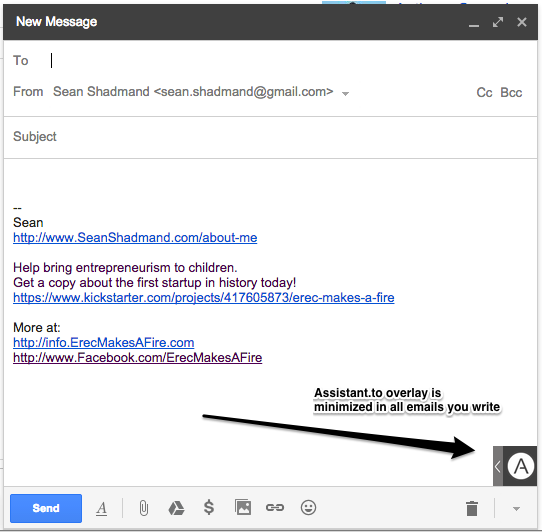
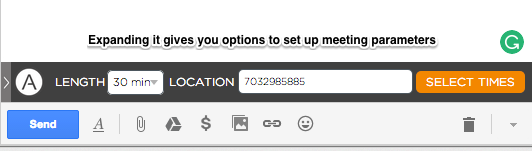
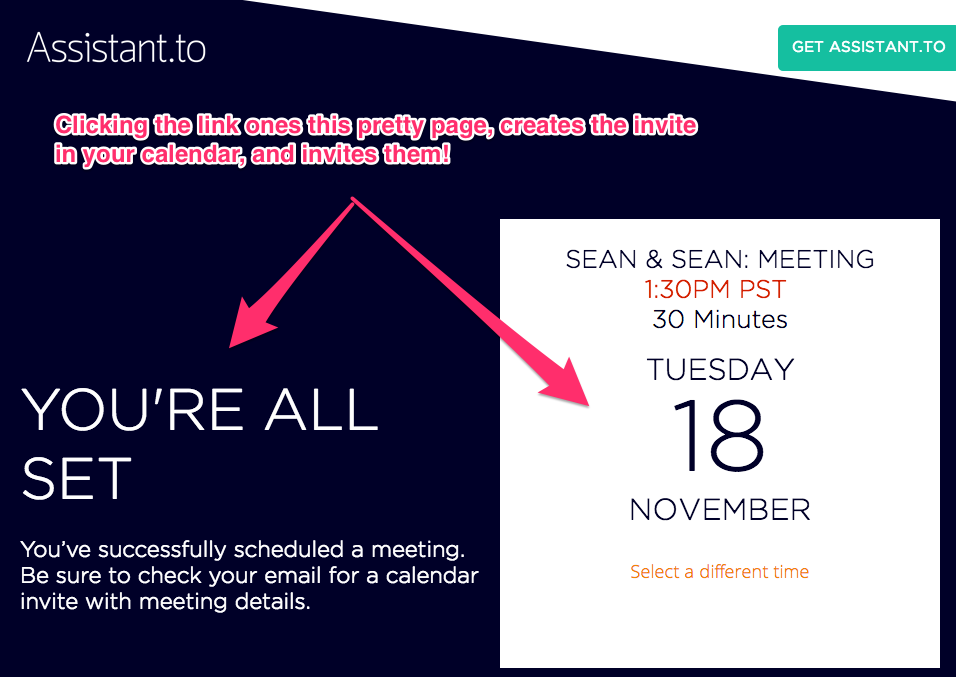
189171-bf657de80640275b84d3931444d6fafe-medium_jpgAn example of a great extension I was introduced to recently is Assistant.to. Assistant.to is a Chrome extension that links to your Google Calendar and extends your Google Email composer so you can easily drop-in potential appointment/meeting times as text and links in your email. There was no setup, all the interaction happens within the GMail composer, and the form factor works in a way that needs no additional explanation or signups for the receiver.

It is a must have tool for sure! Here are some screenshots of the workflow:


Checking_in____-_sean_shadmand_gmail_com_-_Gmail
Extension overlay


Checking_in____-_sean_shadmand_gmail_com_-_Gmail 2
Expanded overlay


Checking_in____-_sean_shadmand_gmail_com_-_Gmail 3
Select availability


Checking_in____-_sean_shadmand_gmail_com_-_Gmail 4
Available times copy and pasted


Assistant_to_-_Your_Personal_Scheduling_Assistant
Meeting confirmed

As a note, another great extensions I’ve been using lately is the one Grammerly.com that allows great inline writting corrections and tools.