Chrome Tip: Multi-profiles and Offline Docs

You may have already used the Chrome incognito profile, but what you may not know about is the fact that chrome now allows you to create and use multiple profiles on your computer. While incognito us used to specfically ensure that no data is stored or tracked on your system based on the sites and pages you visit, profiles allow you to better manage the various ways those pages are stored either online or off. Here is how to use them.

Incognito Mode:

Incognito mode ( i.e. the mode with the browser icon as a sunglass and hat wearing fellow in this blog’s screen shot ) prevents pages you visit from being tracked, stored in history and clears all cookies from your session once the window is closed, no matter what the site you are visiting has set. There are many reasons why you may want to do this. The cite version: You and your girlfriend use the same computer and you don’t want her to know about the surprise earrings you have been shopping for her online. The not so cute version, well, let’s just say you can avoid getting in trouble like Jim Levenstein does in American Reunion. (BTW, that movie is not worth seeing even if to only get the joke)

To enable incognito mode go to the menu ( ) option in the top right corner of your Chrome browser and select “New Incognito Window” or press Command+Shift+N . Also note: Chrome in your app on your mobile device has the same options and works the same way.

Signing in to Chrome

Chrome can connect to your GMail account, and doing so allows you to do things like sync bookmarks between devices, as well as allow you to edit your Google Drive documents stored on the cloud even while you have no internet connection available. This tool came in handy recently when I came up with some ideas for a document I was working on while at a hotel that didn’t have wifi available. I simply made the changes needed and when internet resumed the doc was synced and merged to my online version of the doc. By signing in to your Google account on chrome a default profile for your computer ( i.e. the mode with the browser icon as a head with no face in this blog’s screen shot ) will be automatically assigned to you and connected to the account you signed in with.

To login to your Google account in Chrome go to the menu ( ) option in the top right corner of your Chrome browser and select “Sign In”. You will then be given the Google login page. Sign in as you would with your GMail account and you are all set.

Enabling Your Chrome Profile to Work on Docs Offline

If you haven’t used your Google Drive already you should really take a second to get to know it. Not only can you store 5GB of files of any type for free in your Google Drive AND use them as a local drive on your computer and phone just like Dropbox, BUT you can use it to create and save documents of various types that you can use to collaborate on simultaneous with other users.

To explain the latter more clearly through example: We use Google Docs at Socialize at all our meetings. During the meeting we create a google doc and throughout the meeting anyone can add, append, change or update the way the notes are taken all at the same time. You can see one another typing as you type and often times most of the meeting will be completed in silence while everyone adds their notes to the doc. Collaboration is saved and shared in a document instantly.

But I digress…

To enable your Google docs to have offline access first go to your Google Drive (http://drive.google.com). On the left hand menu select the “more” drop down to reveal extra options. Finally click “offline docs” and enable. Your drive will sync your docs to your local Chrome profile. Note: If you do not see the “Offline Docs” in the “more” dropdown, and you are using Google App for work, you will need to either enable the feature in your Google App’s Admin portal, or get your sysadmin to do it for you. It is located in the Google Drive sectionof the Admin’s “Settings” tab.

Multiple Chrome Profiles

You are probably just fine getting your Google Drive working on your default Chrome profile to work on offline docs, just as I was for quite some time. The problem is that when I tried to enable offline docs for my personal Google Drive documents, as well as my work docs, the Google Drive system did not allow it. Chrome only allows one offline sync per Chrome profile. To fix this problem you will need to create an additional Chrome Profile on your browser ( i.e. create a mode with a different browser icon like the one with the Ninja in this blog’s screen shot ), and then enable Offline Docs in your Google Drive while in the correct profile.

To add additional profiles to Chrome go to the menu ( ) option in the top right corner of your Chrome browser and select “Settings”. Scroll down to the “Users” section and choose “Add new user.” Once you have added a profile correctly your Users section should look something like this:

Switching Between Profiles

To switch between profile simply click the icon for your current profile in the top right of the browser and choose the profile you wish to use. Once selected, a new browser window will open with that profile enabled.

Google Maps for iPhone Saves the Day. Thanks Santa!

It’s finally here – Google Maps for iPhone! Seriously, thank god.

The Apple maps has gotten allot of flack, and I try to stay out of the bashing business, but man – it kept shoving the fact that it blows in my face for quite some time and it couldn’t be ignored.

On my iPhone4 the new Google maps movement is a bit choppy, but that could very well be my old device struggling to keep up. The funny thing about this app coming out now before christmas is that I was seriously considering upgraind to Android (as I believe 2013 will be the true shift for Google/Android’s supremacy  , but with this app iPhone5 slipped right back into my option pool. Interesting play Google, interesting play…

One thing to observe: My home screen of my iPhone has now gone from Apple maps, mail, and safari to now sporting a Google trifecta of Google Maps, Gmail, and Chrome. All with my user account logged in. It is like Google is slowly creating an unatachable symbotic relationship with my iphone. All the apps from Google listed are a bit choppy but I still made them my primary apps for those functions for two reasons, 1) I am ready for a visual/ux refresh and a hybrid of Apple charm with Google power is satisfying 2) I use Google in every other aspect of my life, so why not one more? I see more of this to come in 2013.

Also, cheers to Google for giving into the mobile app revolution and ending their forced fight to “preserve” the HTML5 movement for the better of us all. The goal is always to make great products, and if HTML5 can do that now – use it, if you are giving up quality – don’t. It’s simple. I am glad they and others like Facebook finally realized how to play the game. Although it is a 6 year delayed reaction I am happy it’s here.

How soon before our worlds population limit is reached?

I was watching Doomsday Preppers and one of the segments was on a prepper preparing for over population. As my typical curiosity provokes, I looked up some world growth population stats to see what we are dealing with. I figured I might as share some things I found.


Fertility RateInterestingly, as the life expectancy of the world has increased the fertility rate has decreased. This graph is pretty neat, press play and watch the changes by country over time.

http://goo.gl/6vh8E

Population Growth:World population growth is linear at about 1 Billion per decade.
http://goo.gl/EgJLo
Population Growth Rate:The world population growth rate is shinking.

http://goo.gl/QKgMH

As for the worlds population limit, it turns out to be harder to find. Variables such as technology, and how the environment could change as the population grows makes it difficult to nail down. I seems that a average expectation is 50 Billion, but I have seen estimates to be over 100 Billion as well.

What are the latest apps connecting our digital media worlds?

I wrote a post a few months ago about “tagging” (http://www.seanshadmand.com/2012/03/02/finally-audio-based-commands-that-dont-suck/) looking for products that connect our real world data to our digital device data on demand.

Regarding that, I see the opportunity for how Shazam commercial tagging technology and the Conan show technology, written about in the post will play out for the positive in the near future.

The intonow iPad app (by Yahoo: https://itunes.apple.com/us/app/intonow-from-yahoo!/id406436404?mt=8) allows TV watchers to sync up with any show on TV. It actually works great and integrates social into every show live. I noticed that when I try to sync when a commercial is on it gives a warning: “You cannot sync commercials Which is great — it knows it was a commercial. Now that my iPad is on and open, and sync is well made and works consistently, I can now see the Shazam tagging work beautiful. I don’t expect it to be very far away.

Also, regarding Yahoo, this is the second time (first with producing Burning Love, a great web only comedy series; and the second the intonow mobile app) in a matter of month I have been impressed with what they are putting out in the TV media space. They have a nothing to lose attitude and are able to take the necessary chances needed to be taken by a big company to change the landscape and lead the charge in the inevitable transition into the digital first media world. A great early indicator that they will be big players in 2013.

The difference between the US Debt & Deficit.

The super short version:

Let’s say Sam gets $50 per year in allowance (revenue), but owes his Mom $100 in “debt” after two years.  He accrued that debt by spending $100 per year. So, he spent $50 more per year  (“yearly deficit”) than he made in allowance.

2 years * $50 yearly deficit = $100 debt.


As told by others:

More depth of the difference between debt and deficit: http://ptmoney.com/us-federal-debt-vs-deficit/

Even greater detail specifc to the US economy as it relates to taxes, social security, military spending etc:

http://useconomy.about.com/od/fiscalpolicy/p/US_Debt_Deficit.htm

The History of the US Debt

Breakdown of US Debt Over Time:

Here is a breakdown of debt accrued over 40 years:

http://www.skymachines.com/US-National-Debt-Per-Capita-Percent-of-GDP-and-by-Presidental-Term.htm

Here is a picture snapshot from the site incase your feeling lazy:


Per Presidency Comparison:

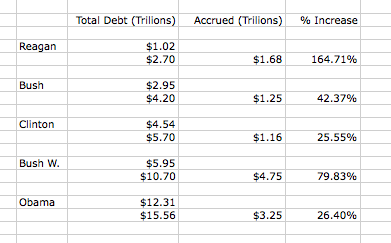
This is the total debt accrued per president in a more condensed format:


I crossed checked it with the treasury data to make sure it was kosher – you can too: http://www.treasurydirect.gov/govt/reports/pd/histdebt/histdebt.htm


Reflection:

The great thing abot history and numbers is it help remind us there is a difference between what rememebr and what really hapened.

If your going to base your opinions on these numbers and term, please know what they are, or else not only are you doing the country a diservice, but you are letting people use your naivety to control your feelings on an issue.

Opinion:

As you can see it isnt a question of president,  the larger issue is that spending more than we make has been an issue without our country as a whole for a long time. Many of us complain about the economy in a warm room with a bed to sleep onand food in our stomach. (Of course many do not, and we need to fix that too), but we spend more than we should, and then hope someone will save us so we can do it again. That might be a better issue to reflect on then the unsubstantiated blame game.

Are you part of the solution or part of the problem? Debate to improve, not to beat.

As we work together let’s keep in mind that one another argument can bring us together through learning or tear us apart through insults. Here are some tips to “keep it clean and productive” if you are thinking about getting in a debate with someone you know, or about something you think you know.

It’s not like this list is meant to be a rule book, but it couldn’t hurt to think about these things next time you get heated about issues. If your purpose is to improve, unite, progress, or fix then I strongly suggest following it. If you enjoy yelling and making claims whether or not they are true or helpful because it makes you feel good, well – you have much more to worry about then winning a casual debate.

  1. Do you truly want to improve and/or find a solution to your problems.
  2. Do you have any facts or examples to back your claims? Can you simply show the source of the facts that upset your, or that you do not agree with to allow the conversation to progress forward?
  3. Is your comment contributing to a divide, or working to decrease one between the person you are arguing with, or the group or person you are talking about?
  4. Do any of your claims contradict another of your claims in anyway?
  5. Could you make a list of your claims to show there is not a contradiction?
  6. Is your statement inflammatory and/or does it question someone’s legitimacy based on your perception of their race, ethnicity, or religion?
  7. Are any of your claims based on the fact that you think someone is out to get you, purely for their hatred of you and/or the country they are trying to govern? Do you really truly think these people hate you and want to destroy the country they also live in?
  8. Can you write down the principle of what you AND they are arguing about? If not do so, or ask them to do so. Make sure you are arguing about the same thing at the same time.


If you think everything is going “down the drain” then what is it that yelling will do to change it? What do you win if you’re right? Work hard on making a difference through learning, discussing, and finding common ground.

Why the color of your neck tie means more then all else

What I want to dive into and can’t wrap my head around yet are the 45% of people that elected the continuation of policies in the 2008 election. Hear me out. 45% of people voted in 2008 to preserve the state of affairs we were in *then*. If you can remember, we actually thought America was about to go under. It was the most scared I have been for an immanent collapse in my lifetime. It was not a Nostradamus prediction of collapse 4 years away, it was collapsing right under our feet. Not everyone can be an economist, but when we were confronted with a collapse in America, that ended up stretching over the western world, 45% of people in the US were like – yeah I can convince myself that it’s okay and can look past all of it – “4 more years!”

Where was all that passion I see now for the obvious change and disapproval needed then? Where was the wherewithal then in holding people accountable for bad policies and a brightless future? I would be far more content if the 2008 election we saw an 80/20 or 90/10 split among voters. But to have passion about creating a bright future, and arguing about the impact of the economy now at an almost equal % breakdown as then is — absolutely mind blowing. The arguments to vote for change then were dismissed by those 45% back then for a far more hopeless situation. If it didn’t matter enough in the last 10 years, why dose it matter so much now?

Is the whole country held hostage by something as simple as switching from a red neck tie to a blue one?

Have we turned politics into a sporting event where your team wins at all costs? Is it the person, the policies, and the state of affairs, or just a jersey and the opportunity to engage in heated arguments over a Poppa Johns pizza that drives us all? Sadly, the last 8 years point strongly to that fact that it is, and that is what has let me down the most. Which ever way you decide to vote now, my issue is with consistency and perspective. What would YOU say to YOURSELF if you went back in time to only 4 years ago? Would you have to change what you were passionate about now just to agree with your former self then? I don’t know how this election will turn out, but I do know that there is a far greater problem in America, the lack of objectivity, and a passion to *find* issues to leverage for the benefit of an election, and not the need to examine an issue for the sake of true, united, prosperity.

Here is one project that could help… Write down what you are so mad/passionate about in this election. Write what you expect and want, and where the failures are that you feel so strongly about. Put them in a box, and read them every 4 years before an election. If Mitt does well then honestly great – I want the *country* to succeed be it by a black, white, or green president. But if he does poorly will you have the objectivity to see it? Or will you make excuses and change your passions so your team, not your country, can win? Will you blame *bad* performance on the last president, would you blame the *great* performance on the last president just the same?

(And don’t be so cocky about how it would play out. 45% of you would have already been screwed if you stared this project only 4 years ago!)

Look, believe what you want, but a great america actually starts with you – not the president.

A great politician will become great at being elected, a great business man will be great at making allot of money for himself, and a great citizen will do what’s best for them and their neighbors. It is tough to trust that all three will work perfectly for one another with such different objectives driving each of them. The greatest side to have faith in and support is, and always will be, the citizen’s side. If you are picking a side, pick our side, the non elected, non-special interests side – the peoples side.

The greatest impact made is not from someone elected, but from those that elect.

Please, keep sports out of politics.

Worried about the future, or another bad decision from your past?

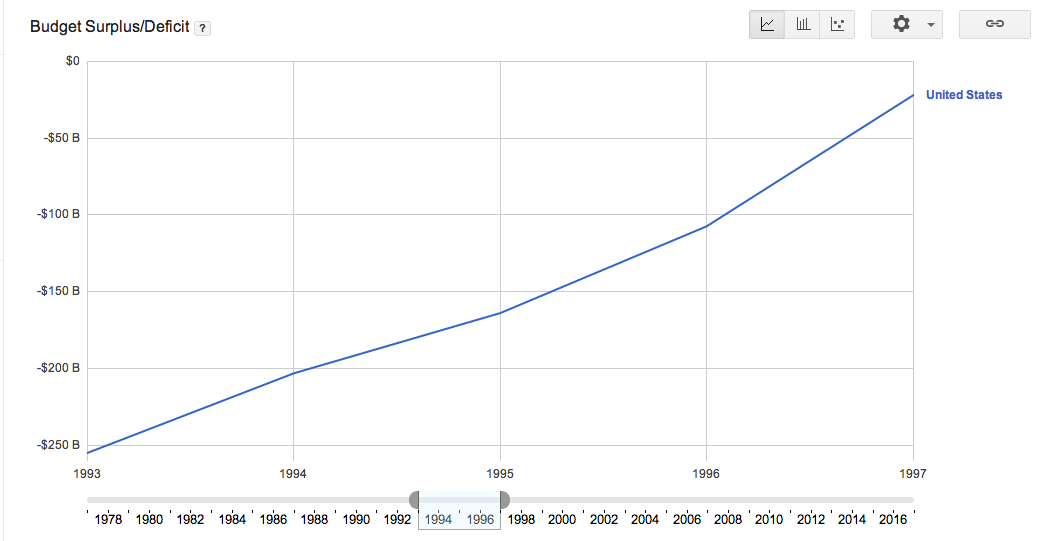
I hear quite a few people tell me that they are “voting on the economy” or that they are fearful of the future. The funny thing is we don’t need to be fearful or imagine the future  we have lived through some scary ups and downs in the past 10 years. The problem with voters that stick to one party or the other is they don’t realize that they are voting for the party, not the economy. How can I demonstrate this? Well instead of me assuming that *you* specifically have a certain type of economic voting track record, I will let you be the judge for yourself. Below is census data since 1993 in four year increments. Look through them and ask yourself how did you vote at the end of the shown term. Did you vote on the economy then? It is very possible that you got what you asked for.

1993-1997: A 200 billion dollar deficit became an almost break even budget.

Did you vote for more of the same, or for change?


1997-2001: If you voted for the same, you got it. A break even budget turned into a 100 billion dollar surplus with highs in the 200 billions.

Did you vote to change or more of the same?


2001-2005: If you voted for change you got it. A 100 billion dollar surplus turned into a sub 300 billion dollar deficit.

Did you vote for change or more of the same?


2005-2009:  If you voted for more of the same you got it. A 300 billion dollar deficit turned into a 1.4 trillion dollar one.

Did you vote for change or the same?

2009-2013:  Not much happened, but we went from 1.4 trillion dollar deficit to 1.3 (I agreed the dotted lines are fake, so I removed them)


The way I see it is all those years in the past you had a chance to vote for more of the same or change, and in the past it’s exactly what you got. Sticking to your “party” instead of voting on what is best for the country is very much what you get: a party in office, not necessarily a better country. So the main thing I want to do is put to sleep the concept of “I’m voting for the economy”. Based on your past it is very possible that you never really have.

What New Apps Are Sean Using These Days?


Someone asked me about new apps I find myself using these days. Figured it would be worth a blog post to post my answer.

So here is a list of newer apps I find my self using on a semi daily basis, that are also new. I have omitted apps I have been using for years now.

Fancyhttp://itunes.apple.com/us/app/fancy/id407324335?mt=8

A new take on Pinterest where yo can buy what you fancy


Lyft
http://itunes.apple.com/us/app/lyft-on-demand-ridesharing/id529379082?mt=8

Car sharing rides by crowd source


Pocket
http://itunes.apple.com/us/app/pocket-formerly-read-it-later/id309601447?mt=8

Save your websites to a list on your phone for reading later

Digghttp://itunes.apple.com/us/app/digg/id362872995?mt=8

After Digg got bought and revamped their App and content seems worth using again and has a second life forming.

LoseIthttp://itunes.apple.com/us/app/lose-it!/id297368629?mt=8

A calorie counter that does a great job with bar code scanning and daily and weekly budgets for your food tracking. Use it daiy.

Other notables:

InstaCart: http://itunes.apple.com/us/app/instacart/id545599256?mt=8

A friend started this one very recently. They are doing food deliveries in under an hour based on food purchased through app.

Seamlesshttp://itunes.apple.com/us/app/seamless-food-delivery-takeout/id381840917?mt=8

This is the only app I buy delivery though

TripIthttp://itunes.apple.com/us/app/tripit-travel-organizer-free/id311035142?mt=8

Love the updates and info on all my upcoming flights. It gets populated through email receipts of my flight purchases.

Of course this excludes many more apps I use allot like Taxi Magic, Uber, Evernote, Mint, E*trade, Spotify, Bank Of America, Facebook, Twitter, Yelp, etc etc
Here are some screenshots of my homescreens. Figured sharing them would be cool. Post feedback or share your own below: