To me pulling back the curtains behind a life, relationship or personality allows us to see the truth: that there is no such thing as the “perfect life” to aspire to. Instead we are all simply working hard on the goal of being the best people, friends and mates we can be. So don’t be so hard on yourself, learn a little, and share a lot.
With that in mind his post inspired me to post this learning from my own life as a serial startup/”entrepreneur guy” in a relationship.
Why You Can’t Optimize for Intimacy
The style of conversation that helps drive interaction, trust, and motivation within a business and its employees doesn’t translate completely with a person you have an intimate, loving, sensual, and sentimental obligation to.
Some things do translate well. For instance, the patience and even keeled temperament required to maintain a level of respect and openness is important to both work and home lives. On the other hand the levels of distance and tone you employ can have a stark difference between the two environments.
As an example, working on an emotional issue with a significant other doesn’t work well with checkins, progress updates, and check lists (which can be cold to a person you sleep next to every night.) While on the other hand focusing deeply on emotions doesn’t work well when communicating clear objectives and goals with peers and employees (that you hopefully don’t sleep next to – ever.) Again, there is some overlap, but the differences are monumental.
For me, being a startup guy in a relationship is a constant lesson in understanding those differences; not focusing on “optimizing” for your relationship but simply nurturing it together.
So in short as the title says: do not optimize for intimacy. And I know if you are a startup person you are thinking right now “I disagree, of course I can if I just…” Stop right there. I know you “can” – but don’t. — I know you think you can – but don’t! The other person may be feeling more focused and diligent (yay!) for now, but probably feeling less connected, heard, loved, or nurtured over all. Even worst they may be feeling like they are at work – and not in a “intimate relationship.” (boo!) :-p
Erec Makes a Fire is a story of how a group of kids stumble upon a cave covered in ancient writings depicting the story of how a unique young cave boy (Erec) accidentally created his first great invention, fire. The story shows how, even in the simplest of times, one is able to form a business, sell a product, and create a success. The book is written to subtly embed one of the most fundamental parts of business in a child’s mind: leveraging an opportunity when finding demand in your community and providing a supply for it. Even before cash, computers, technology, LLC formation or business entities, business and entrepreneurs thrived through observation and invention, and they still do so today. This story helps teach youngsters, and remind their parents, that entrepreneurism is all around us and to keep an eye out for one’s own personal “fire” opportunity.
Why did I write the book?
As a person who loves the world of entrepreneurism, I also love telling a story about how anyone can turn a will or idea into a business. I have enjoyed telling that story, and giving tips on how to do it best, for a number of years through various mediums such as interviews in print, in person, and on TV. Now that more and more of my close friends are having kids I want to share that passion and story through a form that their kids can benefit from. I noticed there wasn’t much out there in the world of children’s books that took business concepts and simplified them into stories kids could love, as well as learn from. So, what else was I to do as an entrepreneur but to fill that void. Erec Makes a Fire is the first in a hopeful series of books that builds a foundation of business mindedness in our children.
Beliefs that inspired
Two major beliefs of mine contributed greatly to the creation of this story: First, immersion is a great key to early developmental learning, and secondly, kids are extremely capable of learning and understanding complex concepts early on, especially when it is told through story and analogy.
In regards to immersion, I believe that even if a child does not understand a concept introduced to them directly, being surrounded by that concept will help them become more comfortable with the subject matter as they mature. This makes the principles taught far less foreign to them, and therefore more easily consumed when they grow up, as compared to those learning the same concepts for the first time later in life.
I also believe that children can grasp complex concepts, like supply and demand or finance, far earlier in their lives than is generally taught today. I have always been amazed at how kids pick up core concepts so deeply. Yet, adults at times “protect them” from complicated concepts for worry of it going over their heads. Supply and demand can have complexities within – yes, but the basics are – well – basic and building stories around those concepts can most definitely be consumed by children. Look how well they understand other stories we give them, like ones around “how to share”, a concept that I find many adults still struggling to grasp. I remember sitting with adults during dinners as a kid while they talked to one another about their businesses around me. Over time and many family diners a grew more familiar with many of the things they talked about while still being a child. Although I was unable to articulate my perspectives on the subjects at the time I mades notes to remind myself that one day, when I got older, I would remember this: kids get more than you think.
Sticker Collection Available Through KickStarter
Erec Makes a Fire is a new kind of children’s book that immerses young people in concepts they should be given the chance to understand early in life so that they can have a foundation for understanding it more deeply as they grow up. As such the company under which the book is created is called “Small People. Big Ideas. LLC”
How and When Can I get it?
The first few copies will be made available as gifted items through a fundraising drive on KickStarter. I have my initial proofs and prototypes complete. Based on how much I can raise through KickStarter I am shooting to making it available by the spring of 2015. There will be special gifts given out through KickStarter in addition to the books themselves to make things more interesting, such as: signed copies; custom printed copies; packages including digital, print version and stickers; as well as custom designs where our artist injects a characterization of your child into a character in the book! Books will be made available through softcovers, hardcovers, and ebooks.
About Kick Starter:
KickStarter is a crowd funding platform that allows projects to get funded before they start. It is a great way to start a business or project and works perfectly with the Erec Makes A Fire book as the funds are only released if the book gets enough demand. The simplest way to think of KickStarter is this: think of those PBS drives on TV, the “If you pledge more than $50 you get this free tote bag” type of promotions. For a project like mine my gift will be an early copy of the book and other creative unique offers mentioned above that only funders will be able to receive. You can read more about KickStarter here: http://www.kickstarter.com/help/faq/kickstarter%20basics#Kick
Erg: Erec’s first customer as a Sticker
Why Did you Spell “Erec” with an “e” instead of an “i” ?
The names of the book are witten with some historical significance in mind. Homo Erectus and Homo Ergaster are the scientific names for the two homonids believed to be around during the time period fire was discovered. So, the characters names in the book take each half of each of those names: Erec, and his friend Tus are the first two characters introduced. Followed by his first two customers Erg and Aster. Just in case though, we made sure Eric Makes a Fire works too 😉
You may have already used the Chrome incognito profile, but what you may not know about is the fact that chrome now allows you to create and use multiple profiles on your computer. While incognito us used to specfically ensure that no data is stored or tracked on your system based on the sites and pages you visit, profiles allow you to better manage the various ways those pages are stored either online or off. Here is how to use them.
Incognito Mode:
Incognito mode ( i.e. the mode with the browser icon as a sunglass and hat wearing fellow in this blog’s screen shot ) prevents pages you visit from being tracked, stored in history and clears all cookies from your session once the window is closed, no matter what the site you are visiting has set. There are many reasons why you may want to do this. The cite version: You and your girlfriend use the same computer and you don’t want her to know about the surprise earrings you have been shopping for her online. The not so cute version, well, let’s just say you can avoid getting in trouble like Jim Levenstein does in American Reunion. (BTW, that movie is not worth seeing even if to only get the joke)
To enable incognito mode go to the menu ( ) option in the top right corner of your Chrome browser and select “New Incognito Window” or press Command+Shift+N . Also note: Chrome in your app on your mobile device has the same options and works the same way.
Signing in to Chrome
Chrome can connect to your GMail account, and doing so allows you to do things like sync bookmarks between devices, as well as allow you to edit your Google Drive documents stored on the cloud even while you have no internet connection available. This tool came in handy recently when I came up with some ideas for a document I was working on while at a hotel that didn’t have wifi available. I simply made the changes needed and when internet resumed the doc was synced and merged to my online version of the doc. By signing in to your Google account on chrome a default profile for your computer ( i.e. the mode with the browser icon as a head with no face in this blog’s screen shot ) will be automatically assigned to you and connected to the account you signed in with.
To login to your Google account in Chrome go to the menu ( ) option in the top right corner of your Chrome browser and select “Sign In”. You will then be given the Google login page. Sign in as you would with your GMail account and you are all set.
Enabling Your Chrome Profile to Work on Docs Offline
If you haven’t used your Google Drive already you should really take a second to get to know it. Not only can you store 5GB of files of any type for free in your Google Drive AND use them as a local drive on your computer and phone just like Dropbox, BUT you can use it to create and save documents of various types that you can use to collaborate on simultaneous with other users.
To explain the latter more clearly through example: We use Google Docs at Socialize at all our meetings. During the meeting we create a google doc and throughout the meeting anyone can add, append, change or update the way the notes are taken all at the same time. You can see one another typing as you type and often times most of the meeting will be completed in silence while everyone adds their notes to the doc. Collaboration is saved and shared in a document instantly.
But I digress…
To enable your Google docs to have offline access first go to your Google Drive (http://drive.google.com). On the left hand menu select the “more” drop down to reveal extra options. Finally click “offline docs” and enable. Your drive will sync your docs to your local Chrome profile. Note: If you do not see the “Offline Docs” in the “more” dropdown, and you are using Google App for work, you will need to either enable the feature in your Google App’s Admin portal, or get your sysadmin to do it for you. It is located in the Google Drive sectionof the Admin’s “Settings” tab.
Multiple Chrome Profiles
You are probably just fine getting your Google Drive working on your default Chrome profile to work on offline docs, just as I was for quite some time. The problem is that when I tried to enable offline docs for my personal Google Drive documents, as well as my work docs, the Google Drive system did not allow it. Chrome only allows one offline sync per Chrome profile. To fix this problem you will need to create an additional Chrome Profile on your browser ( i.e. create a mode with a different browser icon like the one with the Ninja in this blog’s screen shot ), and then enable Offline Docs in your Google Drive while in the correct profile.
To add additional profiles to Chrome go to the menu ( ) option in the top right corner of your Chrome browser and select “Settings”. Scroll down to the “Users” section and choose “Add new user.” Once you have added a profile correctly your Users section should look something like this:
Switching Between Profiles
To switch between profile simply click the icon for your current profile in the top right of the browser and choose the profile you wish to use. Once selected, a new browser window will open with that profile enabled.
For our latest project at Socialize Isaac and I are going to increase the release cycle even further and go from a few releases per group per week, to a few releases per day. I find moving more efficiently and quickly over the years always takes a few non-intuitive jarring mental steps. (If they didn’t we would have been way more efficient as a society way earlier on in history).
Here are a couple things that always seem to be the foundation of inching your way up the efficiency hill.
1) Get to a point at which you truly trust your results, not just feel good or secure about them, but quantitative based results that have a quantitative “I trust this” number. This is what I call the “don’t look over your shoulder moment”, because if you’re looking over your shoulder to make sure nothing has gone wrong, you are not looking forward to make sure new things go right. This accomplished with unit/itests tests, or in our everyday lives marking your calendar or adding a reminder. Even at managing people in the office, time and time again setting up employees to be trusted and autonomous, with a simple audit system to make you aware only if something is wrong, has proven time and time again to produce happier, more creative, more productive employees in a company that can scale. Basically every one wins big when you make sure you create process that handles things that are set to let you know if you need to take action, and quite %100 otherwise.
2) Really reconsider what you’re are willing to bare in mistakes. This is usually a major brain switch moment. Sometimes people can work 100x more efficiently and productively if they just allow themselves to be wrong for a totally fixable 1 minute per year. Yes your server may go down once a year, but instead of working hard to make sure that never happens (which is impossible), work hard to make sure systems are in place to recover super quickly. The funny thing is when you accomplish #1 above, mixed with this #2 item, you start performing better than you could have imagined.
3) Remove process that is there to support the more intuitive faux “warm and fuzzy” feelings that keep 1 and 2 from happening.
4) Always push yourself, and those around you, to test process that offer efficiency gains even if you don’t feel comfortable at first. Comfort is often the foundation of slowness, and trying new things even against your “better judgement” are the only ways to break free.
For you nerds out there, here is the article from github Isaac passed on to me that sparked our latest evolution in product releases. Although this post and its sentiment are, in my book, universal throughout life and business and not code.
Do not trust or love politics, love your people, peers, country, and family.
Politicians will use data for their agenda. If you get wrapped up in it, and start believing what you are *told*, through sound bites and ads, you will be misinformed 100% of the time. More information isn’t tantamount to a depth of information.
This is why I have learned not to trust politics, they bet on people not reading the full story (as wel only have so much time in the day) and try to create anger and conflict to make people mad enough to vote how they want. It feels like THAT is what has gotten worst over the years, not so much what is happening in the world, just the way its agenda is given to us. China does it by cutting off information, the US does it by overloading its people with one sided information.
The good news is that with the advent of the Internet it is now so easy to get the data and documents from the source, and fight back as a citizen saying “don’t use me for your agenda”. No need to go to the library and send letters requesting data that may take days or weeks; it is available now if you are willing to read it.
As my methods to get to the data evolve, I try and follow some procedures to navigate past the political propaganda.
First, If I find a “fact” that I am researching on any news site, I look for the citation for the “fact” so I know where it came from, and then look that fact up from it source to read it myself. If there is not citation, I start over. A citation does not make it data, it just helps you get a path to the source. Secondly, if I find the source I read it, if I cannot find the source I look for the source directly. At this stage in the evolution of my process I have deemed .gov sites and non-profit census bureaus as a final source. In some situation you can never be sure unless you count the numbers yourself, but I have found the most consistency at that level. Yes I know that even the government stats, non profits, and census bureaus can lie but if I can find some consitancy at that level I am pleased.
Lastly, how to spot a fact with skeletons in its closet that should trigger an investigation like the one above before having the debate.
Well, the main thing that triggers a fact check to me are statistics, and references to bill being voted on. Why? Well, over the years I have found that stats have a high potential to be screwed. Or example, what constitutes “1 year” – Fiscal year or calendar year etc. Another example is is the stats extrapolated from previous data or data that has already happened. Another read flag is the use of tag lines, sound bits and general words like “taxes”, and “everyone”, and “higher” — higher then when and what for whom? Also, the reference to bills, are tough to believe from something like “he voted to….” After living in DC and working on capitol hill with you realize that both sides of the fence will quote the same document at different parts and come up with completely different conclusion. It is impossible for both are either to be entirely right, but both sides would never realize that they both *think* they are 100% right. As my readers and friends know by now, one of my big rules of thumb is: If experts disagree it is time to make your own decisions. A bill is written by many people with many agendas for their state. They are stiuffed, written and re-written over and over to try to get as much as they each want to get in it, and keep out as much as they don’t. They do this hours and hours everyday to come to a final document that is then voted on by all parties. It is very important to remember that time line, for no document has one message, and if it passed their is a big chance that both parties voted yes on it (unless there was a big split with few deciding votes). Point being, much could have gone into a document and so much more history to that document then any sound bite could articulate.
So, one of the bills that was brought as a point of contention was based on a sound bites saying “Obama voted on late term abortion”, and it was said that the bill was made to let mothers have the right to kill a baby after it is born alive. Well, personal, I did not know about that bill first hand, and that I promised to look it up. Speaking from my own perspectives I don’t like the sound of it, but I want the source and document first before my personal conclusions on that vote are spoken.
This is one of the actual bills voted on for Illinois referenced. It only took a few minutes to bring up. It was indeed named “Partial-birth Abortion Ban Act”, so that is a true data point. As it turns out was voted on 44-7 (almost everyone agreed in both parties, that decided to attend). Also there were 5 present votes. What does a present vote mean?
The “present” vote is in effect a “no” vote, but it is a “no” vote that sends a message. The “present” vote is used by lawmakers in situations where they agree with a bill in spirit, however the current version of the bill is not good enough to vote “yes;”
The bill, in my first hand summary, would be this: A bill for late term abortion *if* it will kill the mother to have the baby, but still says it is illegal otherwise. But please, do not take my word for it! Read it here:
So it is important for me to see just how complex a bill can be, in addition to how complex it is to create, finalize,vote on and pass, on it.
Another topic was immigration. Stats are the hardest data to really find concrete numbers. There isn’t a list of people that are counted ever. It is def not as easy to get to the bottom of as a document being references. Old census bureus that have been around and referenced over time by both parties is, to me, a better place to start than from a news site, network, or politician.
So here is census data from the Pew Foundation on immigration stats, highest in 2007, and leveled off down by a million the following years.
It is important to note that data usually doesn’t come with a “should”, “good”, “bad”, or “won’t” list of words around it. Why did it go up? That is as complex as why did it go down? And as you will see that once why is added to statistics rarely does a group of experts agree. There are so many variables, and that is where debates and politics I suppose have a place. But I would implore you all out there to start the debate after the data is presented, and be sure not to find yourself repeating an ad or politicians claim that a statistic is “up” or “down” until you read it for yourself from the source.
I think my new strategy will be to make sure that before I argue on big issues like this, especially in DC where the ads and politics are so ripe with contention, I will just say show me the document we are arguing over before getting involved. If we do, maybe the citizens of this country can take back their right to be informed, and to make decisions without political agenda being the force that drives them.
I love making a decisions tree as efficnet as possible, especial around discussion that steer the business or the product within a business. Or in another words, I HATE “tough decisions.”
Here is another addition to the decision tree to make life easier, it is called “Ghetto Testing” and coined by the founder of Zenga.
How do you figure out if you should go with a feature with minmal disruption to the company or its engineers, and how can you invest in it with the highest posible certainty of success? Ghetto Testing a feature. The concept is there are a wide range of data points you can aquire to guage interest on an idea before the idea is fleshed out. At the “Ghetto” stage, it sint so much a test of the product value or feature set itself, as much of a servey to see if the concept will get clicks or interest by the public. It’s basically an adhoc test market. If you think people will love feature x for instance, create a google adword promoting the vapor-ware concept and run it for 5,10,30 mins. The resulting page of the ad could technically go to a 404 page, and although that would be a horrible experience it still wouldbe a valid ghetto test.
From there you can invest incrementally into how deep of a gauge you want to testing of the idea i.e. a pretty landing page with feature highlights, a download, or a purchase wall.
It shows a graphical representation of the frequency words used in books over a rangeof years. It is based on on all the books google has scanned into their database to date.
This TED talk is what turned me on to the project.
The project, the tool and the lecture are all quite entertaining.
Here are some graphs I created playing with the tool. Graphic data, especially that which is based on sentiment represented by our societies authors, gives us amazing clues into how perception and reality intersect.
I really appreciate my education in Computer Science. The most valuable mental shift I gained was the understanding that there are no “hard problems.” To recognize that even extremely difficult problems were easily solved once you were able to deconstruct them into smaller more simple ones. Problem-solving is about figuring out how to simplify, dismantle, and rebuild toward solutions. Simplifying is all about getting good and asking the right questions.
For instance, playing the guitar is hard, playing chords with rhythm is easier, playing chords is even easier, playing a note is more easy – and so on and so forth.
Just breakdown what you want to accomplish and get great at each little piece of it. Then, get great at putting each individual piece together and your problem isn’t all that bad.
Here is a simple breakdown of some popular communication-based internet technologies, in plain English. Hopefully, it will help give readers a better understanding of the basic abilities, purposes, and differences these tools provide.
For each technology, I attached an “In Plain English” video to help explain the usage of the technology. In Plain English became popular in 2008 for their extremely basic no frills explanation of – things. So click on the link for each technology to get a quick breakdown.

 I saw this article posted by a friend on FB by Scott Weiss a VC at Andreessan Horowitz called Success at work, Failure at home.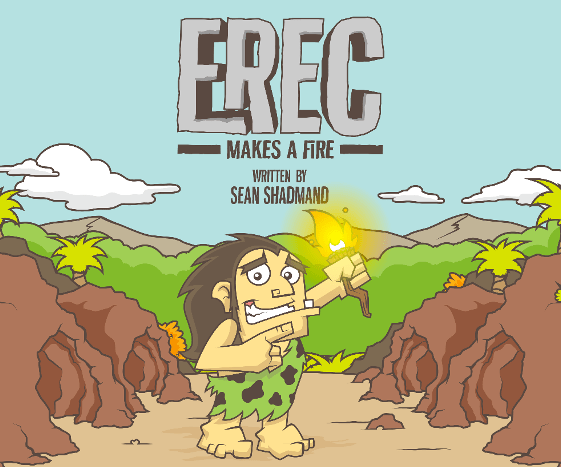



 ) option in the top right corner of your Chrome browser and select “New Incognito Window” or press