Isaac just demoed a great peice of software for the mac or PC called Boxee. Boxee is loaded on your computer and plays online video from hundreds of sources including videos from your local hard drive, hulu, youtube, and digg. Simply hook your computer up to your TV and watch these shows and click through options and menus with your remote. Best of all its an open source project so downloading is free and you are able to improve the product or add your own video modukes as you please.
Since Boxee allows you to login to your favorite social networks you can see what friends are watching while you watch and more. The bads: since it’s open source and downloaded software when a web site that boxee pulls from is changed those interfaces in Boxee fail as well until you download a newer build. Its a great tool and relly merges computer with tv experience, definitly a project that has been needed for a long time and meant for the open soure community.
Okay so only a year ago or so I was a PC MS guy. Since then I have adopted apple like many of you out there for various reasons that I soon shall post, but mostly for iPhone development needs originally. Since then I have set up 3 mac mini’s and 2 imacs. One of the mac mini’s i set up as a remote machine that i screen share to that works as a server for our company. I havent had a single problem and was able to screen share, transfer files, share music, and use any usb or network basd periphreal from printers to ipods to itunes. I was even able to transfer files onto my PC laptop instantly and it took much longer to do the exact same process from the laptop to the mac.
Broke as a joke
I havent really thought to much about it until tonight. Tonight I installed a new PC for my parents becuase 1) They wanted it cause they are use to it and 2) It was under $600. This one machine has taken me hours to set up, and I am so frustrated right now beucase printing was erroring out, not the pronter but the print option would hang. Installing and startng up the machine felt like an eternity and honestly $1500 does not sound so expensive when i think back to how easy all of my other mac based installs have been. I was ready to punch a baby in the face after this MS/PC set up process. Maybe I;’m spoiled by the MAC and I should be more patient with the PC/MS version of computers….or maybe having to be patient with your computer is f’en dumb. Oh, one more thing is it the PC’s fault or is it MS’s. I wonder what would happen if I installed the OS X on this hard ware, is it all in the software all in the hardware, or both?
Balsamiq.com is a web application (that also comes in a downloadable software version) that allows users to quickly create mockups for web sites and iphone products. I was skeptical at first, but 2 things made me pretty happy with thier approach to this common problem.
Mockup
The first was the choice they made to exagerate the concept of fuction over form. Their toolset, or stencils are purposly quasi-poorly hand drawn graphics that have a major lack of attention to detail. As the owners of Balsamiq.com put it, “it encourages critisism” … “so that people don’t get attached to ‘that pretty color gradient'”. The secod thing I liked after playing around with the app a bit was the way they decided to implement the editing process of these draft like stencils. Most implemetations of design toold have properties panels that allow you to change many aspects of a feature, but not only do those properties get complex but since you are given many properties you try to use them in various combinations and often times doing so has unwanted results i.e. certain border style doesnt work well with large boxes with italic text.
Edit Mode
At balsamiq.com the stencils are all pre fab and standard, not much is expected of them other then being better then just a place holder. Content is, for the most part, the only thing you can change and they use a simple text edit box when that content needs to be changed. When you double click a stensil the data is presented in a markdow laguage. i.e. buttons that are hard to align and choose width and colors are nothing more then a comma delimited list in edit mode — (button 1, two, and three). When you click of the text box the buttons are created for you.
They truly stuck to the motto of just use the bare essentials and KISS paradigms to set the expctations of the designers and reviews while making the process of creating dead simple. Which in the end created a great mockup tool, allowig you to focus on what you shoud be focusing on ayways — workflow and content placements.
“Facebook occasionally pairs advertisements with relevant social actions from a user’s friends to create Facebook Ads. Facebook Ads make advertisements more interesting and more tailored to you and your friends. These respect all privacy rules. You may opt out of appearing in your friends’ Facebook Ads below.
Appearance in Facebook Ads”
To find the settings and change what FaceBook and advertisers can do follow the instructions below:
Click on SETTINGS up at the top where you see the log out link. Select PRIVACY. Then select NEWS FEEDS AND WALL. Next select the tab that reads FACE BOOK ADS. There is a drop down box, select NO ONE. Then SAVE your changes. (REPOST and let your friends know).
There are many apis that offer shortening of urls tinyurl.com, tinyurl.cc, bit.ly and many others which have all been useful over the years as services that take a URL like this: http://www.seanshadmand.com/2009/07/18/give-a-hoot-track-your-tweets/ and convert it to a url like this: http://tinyurl.com/len47k. Once the tiny url is clicked a user is quickly redirected to the true url of the site.
HootSuite
Now, with the advent of the Facebook status and more recently Twitter tweets, fitting text based information into a very small space is ever more important and shortening URL’s has become big business and an interesting space to be in for startups these days. (check out some techcrunch articles here at http://bit.ly/jytKD and http://ow.ly/hWSV).
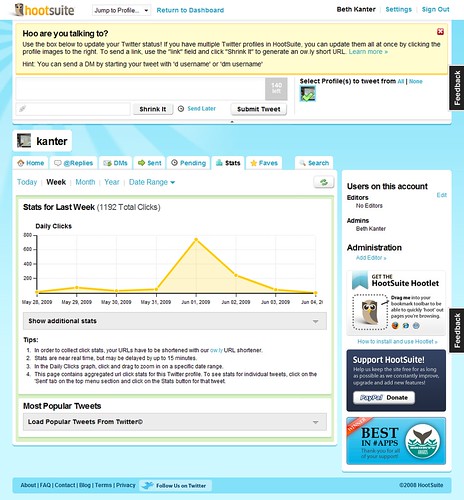
I have recently been turned on to yet another player in the field found at http://ow.ly. This url shortner is provided by a comapny called HootSuite and not only provides shortened urls but aggregates all of your twitter feeds in to one place and allows you to quickly convert all urls within a tweet into shortened ow.ly based urls. The cool thing is those shortened url’s also provide tracking analysis so you can see how many people clicked your link in a line graph inline with all of your posts. Pretty cool, if you twitter at all or can find it usefull to track a urls number of clicks beit through an email or web site give ow.ly or hootsuite a try.
Knol (http://knol.google.com/) is a product from Google that allows users to post content about whatever they feel they have expertise in to th web. At first glance I wondered if this would cannabalise blogger or any other form of content publishing Google already has on the market. After diving deeper I realized that knol is between a blog and a wiki. In that it’s not just for posting information in a time line like a journal, although there are plugins to make blogging apps work less like a journal and more like a site, and it isn’t modertated bu some elite “truth finder” entity like a wiki.
About 6 months a go a friend asked mine asked me for some direction when trying to figure out a way to put up what he knew about his local citities night life, as he found many people came to him for suhc data, but he didn’t want it to neessacarily be a blog. A blog in his eyes was to date based and abstract. He wanted a different interaction model that allowed users to dive into specific ascpets of information about going out in his city. Not knowing of Knol at the time I told him the simplest thing to do would be to start writing a blog and if there is traction but some extra time into manipluate the front end to cater more to his needs through stylings and graphics or plugins. So based on that interaction with him then I can see exactly how Know could have an audience to cater to. I offered this tool to him recently and he seemed pretty excited about it. I awat his response on how much better it is then the blog and I’ll be sure to let y’all know what he finds as soon as I get the info myself 🙂
Latest coool app that takes augmented reality and makes it practicle for the everyday user using GPS and the New York City Subway.
Augmented reality uses your screen to superimpose CGI or digital media as an overlay to a real life realtime backdrop. The first big example of comercial use I know was by GE who did thier own version of augemnted rality for thier website. On the site GE asked its users to print a pattern out and hold it up to the camera on thier computer. The site would recognize the pattern and place digital graphics, of a wind mill for instance, on top of that pattern but using the computers camera. They also added an audio feature so that when you blew on the microphone the windmills would start turning. Here are some other exampes of augmeted reality on youtube.
Now the latest augmented reality product is out on iPhone and allows users to not only see the nearest NY metro stops to them but it overlays a marker in realtime over the video functionailty of the camera so that you can see the marer over the landscape in fornt of you. With teh camer faced town arrows are placed on the ground, through the camera, showing you the direction you need to walk to get to the metro of your choice. Check out more iformation and a video on crunch gear showing off how it works here and learn more about the comapny that produced it called AcrossAir here.
Finnaly got the invite tonight from Google Voice, Googles completly free phone forwarding and voice mail service. Google voice is the new version of what was fromerly known as grand central. The servcie lets you choose a phone number and all calls made to that number are forwarded to a number of your choice, be it cell phone, home phone or work. There are a good deal of options and setting that come with this service and overall it seems to be a pretty cool evolution in phone messaging. Phone VM transcription services and magaement systems have been around for years but as usual Google has made this service free now so other small businesses will be hard pressed to beat that bottom line.
GV Phone App
One great feature is the transcription service for all voice mails. When a user calls and leaves a voicemail message Google takes the voice stream and converts it to text. You can then read the voice mail via email, text message, through the Google Voice portal or through the downloaded phone application for Android or Blackberry. The transcription works well pretty well most of the time, although it’s not perfect just yet. Phone numbers were deciphered 100% accuratly, so far at least, and you can always play the voice mail along with the text if you have any problems with the transcription. Also, on the phone app the text is higlighted as the voicemail is read to you. If you want multiple numbers going to and from a single number check out vumber.com for multinumber. Note: There is one place that Google Voice charges, international calls.
Phone App VM Inbox
As far as anyother charges that one could inccur from the phone network, I called T-Mobile and the representative said that many companies in the VM business have worked payments sytems with phone carriers out to make sure although you aren’t chareged for these services you dont abuse the carriers lines either. Of course rates will vary between plans and carriers so make sure you check your plan for details but in my plan I get 500 forwarding minutes during peak time. If thise minutes get used up then forwarding gets counted against my regular minutes, once again only during peak hours. All in all it would take alot of long messsages to go over those limits so I am happy with both sides of the system so far. I will see at the end of this month if what I was told ends up what i see on my bill..
Also, Daniel tunred me on to some cool settings for GSM phones. You can force your carrier to use a third party VM service so all your calls either through Google Voice or through your own personal exsisting number uses the Google Voice VM service. You can find out how to set that up here (http://go.danielodio.com/voice). Bassically dial *004*1[yourVMservicenumber]# (i.e. *004*15551234#) and all future VM calls will be sent to the VM service phone number provided.
Below are some screen shots of the dash board and settings provided by the Google Voice service.
Dashboard inbox diplsay VM messags and their transcriptions. You can send SMS messages and call from your dashboard as well. If you use gmail all your contacts come along with the dashboard so who is calling is not just a phone number but a name and picture could be associated with each entry.
Home Screen
This cool feature below lets you create VM greetings that change depending on who is calling you. Have a professional greeting for unkown and work contact and a fun one for friends.
Group Specific Setting
Send transcriptions to email or via SMS, screen callers or keep calls from ringing your phoen and going straighth to VM with do not disturb option.
General Settings
Google also has a widget that lets you put a contact me area on yor page so people can call yo without having to know your direct number.
The day of charging directly for goods may be back! People are scrambling to figure out ways to make the new mobile phenomenon lucrative and with apple ingeniously associating a credit card and account for each individual along with their iPhone to handle all transactions apple has masterminded the perfect segway to this new consumerism cost structure. With all your credit info on file apple makes it easy fora business to accept a users purchases with no overhead. A business can focus on thier ocntent and thier app and apple takes care of sales a distributions allowing companies to sell apps for only a few bucks and hopefully make up for it all in the amount of churn these simple apps produce. Sort of the same way charging 99cent for a song instead of 15$ for an album in a store apple now has people spending hundreds or even thousands a year on music, the same can go with the new micro payment model for segments of applications and content introduced withe the latest iPhone sdk 3.0.
Now with micro-payemnts that concept of the neo consumer is refining itself yet again. Imagine getting high quality content where more in depth info only costs an additional 10cents. Yeah you’re paying for content when it may have been free but less ads, greater focus and the ability to pick and choose you whats important to you on an adhoc level is way ore costefective and simple the buying a whole newspaper form a stand for over a buck and throiwng half of it away since you only want the sports section. 10 cent is a sneeze for most people and you dont have to open your wallet or input your credit information. Maybe this is what PayPal envisioned for their future in their earlier more mobile days.
Imagine breaking up cost points by actions where an in depth graph can be download and send to your coworkers for 50 cents, extra weapons in games to help defeat your opponents and extra dollar or ecards that costs only pennies on the dollar. Your finances for all purchases are funneled through a single source and sent as a weekly or monthly statement. Pick and choose what content work best for you and pay almost nothing for the thing you specifically want. This could be an interesting revolution in the online charge model.
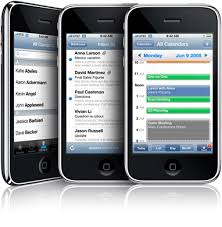
Seems silly at this point but iPhone SDK is still without an API to push events to a persons calendar on the phone. Really? I mean what could happen that apple is against. You can get a users location based on GPS, which would seem more invasive then allowing a user to click a button to add it to their calendar. Is Kim jung il running apple while Jobs is out sick? — Maybe they are the same person; — I mean I have never seen them in the same place at the same time! Weird.