Google Hangouts Finally Work!

I have been trying Google Hangouts sporadically for the last … 6 months or so. Using it once a month to handle a group chat or video chat instead of my regular Skype, phone, or webex usage. It improved tremedously each month, but since in the first few months it wouldnt evenload correctlt thta wasnt saying much. By the time it finally started loading correctly for me it was dropping calls left and right and very choppy in the UI.

All that being said, it was a great day in the video conference world today: our team at Socialize used Hangouts for a group call and it worked flawlessly! Hooray, finally a group video chat system that actually works. Of course I am holding back a little bit since most video chat services are hit or miss, but I must admit that the steady growth of improvement on Google Hangouts is nice, and if it keeps up this trajectory it will be the goto for me and my team.


Some cool features that come with GHang:

1 – You can schedule a hangout on your calendar

2 – You can video chat with multiple poeple for free

3 – It comes with the standard “effects” sweet people know and love. We had a good time using the “applause” effect for each persons update, and the “gong” effect when the meeting was over.

4 – You can screen share to the group pretty easily

5 – You can pull in your Google Drive data into the chat. Which is nice for us since we use GDrive a lot. I haven’t tried it yet, but presentations in GDrive should integrate well…

Give Google Hangouts a shot, and let me know if it worked smoothly for you too, or if my glee is premature.


Chrome Tip: Multi-profiles and Offline Docs

You may have already used the Chrome incognito profile, but what you may not know about is the fact that chrome now allows you to create and use multiple profiles on your computer. While incognito us used to specfically ensure that no data is stored or tracked on your system based on the sites and pages you visit, profiles allow you to better manage the various ways those pages are stored either online or off. Here is how to use them.

Incognito Mode:

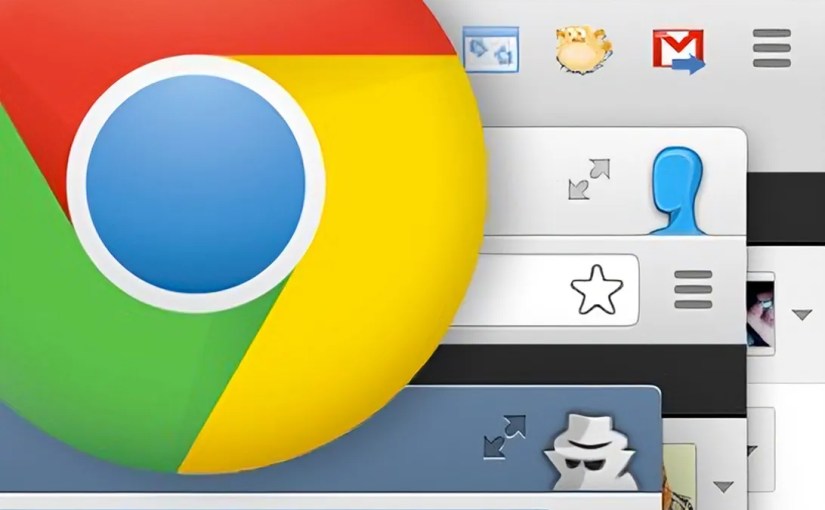
Incognito mode ( i.e. the mode with the browser icon as a sunglass and hat wearing fellow in this blog’s screen shot ) prevents pages you visit from being tracked, stored in history and clears all cookies from your session once the window is closed, no matter what the site you are visiting has set. There are many reasons why you may want to do this. The cite version: You and your girlfriend use the same computer and you don’t want her to know about the surprise earrings you have been shopping for her online. The not so cute version, well, let’s just say you can avoid getting in trouble like Jim Levenstein does in American Reunion. (BTW, that movie is not worth seeing even if to only get the joke)

To enable incognito mode go to the menu ( ) option in the top right corner of your Chrome browser and select “New Incognito Window” or press Command+Shift+N . Also note: Chrome in your app on your mobile device has the same options and works the same way.

Signing in to Chrome

Chrome can connect to your GMail account, and doing so allows you to do things like sync bookmarks between devices, as well as allow you to edit your Google Drive documents stored on the cloud even while you have no internet connection available. This tool came in handy recently when I came up with some ideas for a document I was working on while at a hotel that didn’t have wifi available. I simply made the changes needed and when internet resumed the doc was synced and merged to my online version of the doc. By signing in to your Google account on chrome a default profile for your computer ( i.e. the mode with the browser icon as a head with no face in this blog’s screen shot ) will be automatically assigned to you and connected to the account you signed in with.

To login to your Google account in Chrome go to the menu ( ) option in the top right corner of your Chrome browser and select “Sign In”. You will then be given the Google login page. Sign in as you would with your GMail account and you are all set.

Enabling Your Chrome Profile to Work on Docs Offline

If you haven’t used your Google Drive already you should really take a second to get to know it. Not only can you store 5GB of files of any type for free in your Google Drive AND use them as a local drive on your computer and phone just like Dropbox, BUT you can use it to create and save documents of various types that you can use to collaborate on simultaneous with other users.

To explain the latter more clearly through example: We use Google Docs at Socialize at all our meetings. During the meeting we create a google doc and throughout the meeting anyone can add, append, change or update the way the notes are taken all at the same time. You can see one another typing as you type and often times most of the meeting will be completed in silence while everyone adds their notes to the doc. Collaboration is saved and shared in a document instantly.

But I digress…

To enable your Google docs to have offline access first go to your Google Drive (http://drive.google.com). On the left hand menu select the “more” drop down to reveal extra options. Finally click “offline docs” and enable. Your drive will sync your docs to your local Chrome profile. Note: If you do not see the “Offline Docs” in the “more” dropdown, and you are using Google App for work, you will need to either enable the feature in your Google App’s Admin portal, or get your sysadmin to do it for you. It is located in the Google Drive sectionof the Admin’s “Settings” tab.

Multiple Chrome Profiles

You are probably just fine getting your Google Drive working on your default Chrome profile to work on offline docs, just as I was for quite some time. The problem is that when I tried to enable offline docs for my personal Google Drive documents, as well as my work docs, the Google Drive system did not allow it. Chrome only allows one offline sync per Chrome profile. To fix this problem you will need to create an additional Chrome Profile on your browser ( i.e. create a mode with a different browser icon like the one with the Ninja in this blog’s screen shot ), and then enable Offline Docs in your Google Drive while in the correct profile.

To add additional profiles to Chrome go to the menu ( ) option in the top right corner of your Chrome browser and select “Settings”. Scroll down to the “Users” section and choose “Add new user.” Once you have added a profile correctly your Users section should look something like this:

Switching Between Profiles

To switch between profile simply click the icon for your current profile in the top right of the browser and choose the profile you wish to use. Once selected, a new browser window will open with that profile enabled.

Google Maps for iPhone Saves the Day. Thanks Santa!

It’s finally here – Google Maps for iPhone! Seriously, thank god.

The Apple maps has gotten allot of flack, and I try to stay out of the bashing business, but man – it kept shoving the fact that it blows in my face for quite some time and it couldn’t be ignored.

On my iPhone4 the new Google maps movement is a bit choppy, but that could very well be my old device struggling to keep up. The funny thing about this app coming out now before christmas is that I was seriously considering upgraind to Android (as I believe 2013 will be the true shift for Google/Android’s supremacy  , but with this app iPhone5 slipped right back into my option pool. Interesting play Google, interesting play…

One thing to observe: My home screen of my iPhone has now gone from Apple maps, mail, and safari to now sporting a Google trifecta of Google Maps, Gmail, and Chrome. All with my user account logged in. It is like Google is slowly creating an unatachable symbotic relationship with my iphone. All the apps from Google listed are a bit choppy but I still made them my primary apps for those functions for two reasons, 1) I am ready for a visual/ux refresh and a hybrid of Apple charm with Google power is satisfying 2) I use Google in every other aspect of my life, so why not one more? I see more of this to come in 2013.

Also, cheers to Google for giving into the mobile app revolution and ending their forced fight to “preserve” the HTML5 movement for the better of us all. The goal is always to make great products, and if HTML5 can do that now – use it, if you are giving up quality – don’t. It’s simple. I am glad they and others like Facebook finally realized how to play the game. Although it is a 6 year delayed reaction I am happy it’s here.

What are the latest apps connecting our digital media worlds?

I wrote a post a few months ago about “tagging” (http://www.seanshadmand.com/2012/03/02/finally-audio-based-commands-that-dont-suck/) looking for products that connect our real world data to our digital device data on demand.

Regarding that, I see the opportunity for how Shazam commercial tagging technology and the Conan show technology, written about in the post will play out for the positive in the near future.

The intonow iPad app (by Yahoo: https://itunes.apple.com/us/app/intonow-from-yahoo!/id406436404?mt=8) allows TV watchers to sync up with any show on TV. It actually works great and integrates social into every show live. I noticed that when I try to sync when a commercial is on it gives a warning: “You cannot sync commercials Which is great — it knows it was a commercial. Now that my iPad is on and open, and sync is well made and works consistently, I can now see the Shazam tagging work beautiful. I don’t expect it to be very far away.

Also, regarding Yahoo, this is the second time (first with producing Burning Love, a great web only comedy series; and the second the intonow mobile app) in a matter of month I have been impressed with what they are putting out in the TV media space. They have a nothing to lose attitude and are able to take the necessary chances needed to be taken by a big company to change the landscape and lead the charge in the inevitable transition into the digital first media world. A great early indicator that they will be big players in 2013.

What New Apps Are Sean Using These Days?


Someone asked me about new apps I find myself using these days. Figured it would be worth a blog post to post my answer.

So here is a list of newer apps I find my self using on a semi daily basis, that are also new. I have omitted apps I have been using for years now.

Fancyhttp://itunes.apple.com/us/app/fancy/id407324335?mt=8

A new take on Pinterest where yo can buy what you fancy


Lyft
http://itunes.apple.com/us/app/lyft-on-demand-ridesharing/id529379082?mt=8

Car sharing rides by crowd source


Pocket
http://itunes.apple.com/us/app/pocket-formerly-read-it-later/id309601447?mt=8

Save your websites to a list on your phone for reading later

Digghttp://itunes.apple.com/us/app/digg/id362872995?mt=8

After Digg got bought and revamped their App and content seems worth using again and has a second life forming.

LoseIthttp://itunes.apple.com/us/app/lose-it!/id297368629?mt=8

A calorie counter that does a great job with bar code scanning and daily and weekly budgets for your food tracking. Use it daiy.

Other notables:

InstaCart: http://itunes.apple.com/us/app/instacart/id545599256?mt=8

A friend started this one very recently. They are doing food deliveries in under an hour based on food purchased through app.

Seamlesshttp://itunes.apple.com/us/app/seamless-food-delivery-takeout/id381840917?mt=8

This is the only app I buy delivery though

TripIthttp://itunes.apple.com/us/app/tripit-travel-organizer-free/id311035142?mt=8

Love the updates and info on all my upcoming flights. It gets populated through email receipts of my flight purchases.

Of course this excludes many more apps I use allot like Taxi Magic, Uber, Evernote, Mint, E*trade, Spotify, Bank Of America, Facebook, Twitter, Yelp, etc etc
Here are some screenshots of my homescreens. Figured sharing them would be cool. Post feedback or share your own below:

Efficiently Inefficient: Processes that can improve quality and quantity of life

For our latest project at Socialize Isaac and I are going to increase the release cycle even further and go from a few releases per group per week, to a few releases per day. I find moving more efficiently and quickly over the years always takes a few non-intuitive jarring mental steps. (If they didn’t we would have been way more efficient as a society way earlier on in history).

Here are a couple things that always seem to be the foundation of inching your way up the efficiency hill.

1) Get to a point at which you truly trust your results, not just feel good or secure about them, but quantitative based results that have a quantitative “I trust this” number. This is what I call the “don’t look over your shoulder moment”, because if you’re looking over your shoulder to make sure nothing has gone wrong, you are not looking forward to make sure new things go right. This accomplished with unit/itests tests, or in our everyday lives marking your calendar or adding a reminder. Even at managing people in the office, time and time again setting up employees to be trusted and autonomous, with a simple audit system to make you aware only if something is wrong, has proven time and time again to produce happier, more creative, more productive employees in a company that can scale. Basically every one wins big when you make sure you create process that handles things that are set to let you know if you need to take action, and quite %100 otherwise.

2) Really reconsider what you’re are willing to bare in mistakes. This is usually a major brain switch moment. Sometimes people can work 100x more efficiently and productively if they just allow themselves to be wrong for a totally fixable 1 minute per year. Yes your server may go down once a year, but instead of working hard to make sure that never happens (which is impossible), work hard to make sure systems are in place to recover super quickly. The funny thing is when you accomplish #1 above, mixed with this #2 item, you start performing better than you could have imagined.

3) Remove process that is there to support the more intuitive faux “warm and fuzzy” feelings that keep 1 and 2 from happening.

4) Always push yourself, and those around you, to test process that offer efficiency gains even if you don’t feel comfortable at first. Comfort is often the foundation of slowness, and trying new things even against your “better judgement” are the only ways to break free.


For you nerds out there, here is the article from github Isaac passed on to me that sparked our latest evolution in product releases. Although this post and its sentiment are, in my book, universal throughout life and business and not code.

http://scottchacon.com/2011/08/31/github-flow.html

The summary of my rabbit hole conversation with big media company and how they see digital vs linear

Them: Linear does not easily show ROI, we are slaves to Neilson and the data isn’t even accurate. – Digital has a definite ROI we can track.

Me: Is getting digital traffic and market appeal your #1 focus then?

Them: No, we don’t drive search and discovery towards digital nearly as much as linear

Me: Why?

Them: Because digital doesn’t make good money

Me: Why?

Them: Digital doesn’t get good value on ads or have enough ad fill compared to linear so there is less money

Me: Why not?

Them: becuase advertiser don’t spend there money on digital

Me: Why not?

Them: because there isn’t enough traffic going there with the right type of viewers?

Me: Do you know why there is a difference in veiwer types or know exactly what types of veiwers are on each?

Them: No.

Me: Do you try to drive the users you do like or want to digital?

Them: No.

Me: Why not?

Them: because there isn’t money there

Me: Is there ad roll in streaming video on digital?

Them: Yes

Me: Can you track ROI and metric/conversions easily in digital?

Them: Yes

Me: What is the retention on digital for vistors to streaming and non streaming video?

Them: Very high

Me: Why don’t you push people toward digital that you have ROI metrics on that you can push?

Them: Becuase there isn’t as much money in digital…

—Start over from top

Funny thing is as I looked at them like they are on crazy pills, they looked at me the same way. I think the next big media company will be one with less to lose so they can open their eyes at taking the necessary risks needed to evolve into the new market. Maybe Yahoo studios?

Entertainment Reprise

We are becoming part of a more generalized entertainment structure in our society. No longer is it defined by the length of time the product presents itself, the depth of interaction it offers, the star being living or made-up, the device in which the interaction takes place – or the time in between each interaction. We are now in a world where those versions of the product can be matched, bundled and even merged to create a whole new ecosystem. We are living in a  world where all types of entertainment, big games and small, game shows and reality, information and news, can sit side-by-side, hand-in-hand, equally, through any channel they choose without prejudice or barriers. Your entertainment is free at last, and we are the entrepreneurs that will shepherd it into this new world, slicing through old corporate structures, and short sighted economics, to build a brighter and far more entertaining future.

Fake Response Server: Slow response time generator

Here is another quick tool built on AWS. This one is super simple, but pretty handy. Today Twitter went down, and somewhere in our system we were using the Twitter API to display one of our status feeds. Them being down became us being slow.

Well, I wanted to do some quick tests to keep this from happening again, but byt the time I got to it Twitter was responsive again. To fix it I would need to create a bad URL. The crappy thing is I wanted a slow response time, not exactly a bad response/error. Creating a 404 error is easy, just go to some url that doesn’t exists and test. But I want a slowwwww response.

I quickly searched Google for something I could use, and didn’t find one. When I realized I would have to create a fake pause endpioint somewhere I figured someone else out there might benfiift from a quick public version of this system. So, I created fake response server. The first default endpoint available sleeps for a variable time.

https://fakeresponder.com

and add a sleep param to change the sleep time in milliseconds

https://fakeresponder.com?sleep=500

Nothing major, but why not publicize the tool incase it can help some other shmuck out there like me 🙂

Cheers.

My first iMovie: Demoing a product

Here is a vid of the Android demo. It is my first iMovie project so it’s a bit rough around the edges, ut to be honest it was kind of fun to do.
I’m looking forward to making the iOS one, or for any feature for that matter, and taking what i’ve learned to improve.
Some tips, lessons learned that I wish I did.:
– Take you finger away from the shot after every action, it makes it way easier to cut up
– Shoot it side ways so the stage is not taller than wide
– tape the phone down and mount your camera so it doesnt move throught the shot. again, better cutting chances.
make a short movie first and play with all the transitions, and effects and themes. Cut up your movie and add each clip to the stage and add some text and transitions again. Then add some music. I would have saved allot of time on the final if I had known what I know afte the final was made, but by te end of the real movie i was to tired to go back and start over.