This is pretty awesome… A real hovering ball that seems to defy gravity and do some other neat tricks too. Yeah, we have seen some cool hovering toys these last few years, but this little doozy goes well past just hovering. Not only does it hover, but it is able to jet of in any direction lickity split, and its gyroscopes (along with its auto pilot mode) give it the ability to stay in hover state no matter how hard you try to push it down. Just when you think you got your bearing with this thing it shows off a few more tricks as it dives to the floor, rolls over better than your dog skip, andtake right back off again. It seems to master land and air, and is made by the Japan’s ministry of defense.
Category: Technology
Easter Egg-ish Feature in Google Image Search
You have probably searched for images on google image search before, but what you probably missed was the drag and drop image search feature. After hovering over an image from the image search results (ex: http://goo.gl/hwiJ0) drag the image over to the search text box. Once the image overlaps the search box, the search box extends allowing you to “drop the image” there.
What seems to happen next is google uses meta data about the image selected to generate a text search that display results of web sites that are related to the picture.
There was a google labs project a while back that gamified the manual tagging of images, mechanical turk style. Maybe this is one of the bi-products of that project.
Has the iPhone camera quality really improved?
Check out the picture below made by Lisa Bettany and featured on Gizmodo that demonstrates the differences in picture quality over the many iPhone generations. From the original, all the way to the 4S. The simple answer to the titles question – you bet you a$$ it has!
Are you seeing things? Instant super-imposed 3d objects on 2d pictures
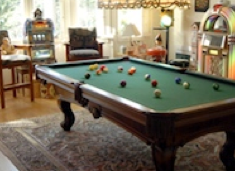
See that picture to the left. It is a picture taken of a room with a billards table, can you tell what part of the picture is fake? We have all hard of super imposed by now (even the talking goat from Adam Sandler’s comedy cd in the 90s is now aware of the power of superimposing.) What makes this a breakthrough is that fact that the 3d objects (by the way, the balls on the table are the fake objects) were super imposed onto a flat, 2D picture. Even more interesting is that fact that those 3D objects can interact with the 2D objects in the picture, as if they were 3D them selves. Check the demo by Kevin Karsch (below) where you can see what I mean. Basically, you can take picture of a hall with stairs, and later add a 3D virtual ball to the picture, and in seconds watch the 3D ball bounce its way down the stairs case. Pretty B.A.
Prove It! Would you bet your life on your wifi connect-ability?
It’s fine and dandy when you say you can get three nines of service uptime, but would you be willing to have your server control your car’s brake system? Well if you did I woud guarantee you that your servers would find a way to be up more often – one way or another. That is what Computer scientists at Saarland University were thinking when he used their wifi as the communication channel is their bikes. They wanted to demonstrate how certain they were that their wifi can get up to thirteen-nines of accuracy. I really love how they are putting their money where his mouth is. They basically alined their lives and their product’s quality perfectly. Now their success is yours 🙂
Check out more at Alpha Galileo.
Braille 2.0
The iPad (tablets) is at it again. After all these years Stanford has uped the anti on what the bar is for acceptable braille reading and writing devices. The tablet system shown here calibrates through a swipe and audio queues, and sets the type pad to where ever the users fingers lie. (This solves the problem with the lack of tactile response the flat screen of an iPad provides. In essence, as descried in the video, the input points find the users fingers, not the other way around.)
A new dimension to the multi-toch
Screw watching 3D Screens, actually grab 3D objects!
Microsoft is doing some cool stuff with interactive vertual 3d. No cords, or gloves, or glasses required. They are working on holograms, and not just for looking at. These holograms are able to be controlled by “touch” and simulate true interaction with virtual objects with the help of a real time physics engine. In short, it is starting to look pretty cool. If this technology continues to advance designers will be able to virtually interact with the models they create before they start need to develop any molds. At the end of the video they demo a mobile device that a user is able to pick up, interact with it, and all within a completely virtual holographic environment.
Curious to see how it’s done? At min 1:02 they show how the system recognizes real objects, such as hands, paper, or bowls, and displays how they interact with the virtual objects onto a clear glass plate. This plus the users line of site create the illusion of true interaction with the virtual objects.
I can’t wait for these technologies to find their way into meetings, to help team of engineers quickly to get on the same page by passing a prototype, modeled only moments ago, at a round table, as they literally pass the object from one person to the next.
Pictures that are literally worth over a million words
Check out this cool little tool: Google N-Grams
It shows a graphical representation of the frequency words used in books over a rangeof years. It is based on on all the books google has scanned into their database to date.
This TED talk is what turned me on to the project.
The project, the tool and the lecture are all quite entertaining.
Here are some graphs I created playing with the tool. Graphic data, especially that which is based on sentiment represented by our societies authors, gives us amazing clues into how perception and reality intersect.
Creative ways to tell your story through scrolling.
I read somewhere many years ago that the experience of allowing the user to ready just enough content until the fold, but giving them just enough info that there is more uner the fold was a better tactic then framing your site above the fold with links to actions. For sites that want to say allot, and take users on a journy the scroll is smoother and quicker. It is like a timeline of content from top to bottom, as apposed to a choose yoru own adventure. Since then, I have seen some pretty cool examples of implementations like this. The lastst one I came across was from mozilla (https://webfwd.org/en-US/) Which would make sence since they are the advocates of the web.
Here are some slides (in case they change the site by the time you read this.)
The main home screen looks pretty standard. But notice the color and the footer….

As you scroll up he page the footer rises from the bottom, revealing a whole other expereince….

As the you scroll up, the color of the back ground fades into white, and the old footer is now the new header. I thought it was a beautiful experience…

I have seen many variations of the concept of scrolling while browsing the internet. Here are some others:
This one is called “Ben the body guard” and it was a website for a game. (http://goo.gl/HG9PQ) In this creative experience, the body guard tells you his story as you scroll down the page. The animation of his walking and the street passing by are all based on your scrolling down the page. After the story and his walk is over, the links are neon signs on the buildings rooftops, and the bottom of the page gives you a link to the appstore and a close up of ben peerig down the edge of the top of a high rise. Well done!