Do you see what I see?

Can you guess who that famous person is in the image on the left? Not a clue huh? Well it’s Steve Martin in a scene from the movie Pink Panther. But it isn’t exactly straight from the big screen film, and it isn’t exactly not from the movie either. Confused? Well, it is a mind boggling concept. The technology that Jack Gallant, a neuroscientist at U.C., has developed is able to produce a video from what a persons mind is seeing or thinking.

It really is hard to explain the amazing nature of the this technology so I attached a video below showing it in action. It’s is a must see, and probably is THE most amazing technology I have seen in my entire life.

It’s is interesting how many of the representations of people look primarily the same from the minds eye, and how there are strange over laps of data on others at times. Almost like you can see the minds eye wander, or you can see the related emotions that are associated with some visual queues.

You also have to give allot of credit to the impressionist movement. They were way ahead of their time. As you can see they completely got the nature of the difference between what we “see”, and what we remember or interpret even though we don’t realize it. The videos also remind me allot of what it feels like when I am dreaming.


Video: Left side what was actually seen, right side what the technology decoded from the brain:

Video games may rot your brain, but those gamers may help find the cure for AIDS

Just when parents and wives everywhere finally got thier point across to get their loved ones out from in front of the large screen TV and unplugged from their beloved game console, a twist emerges.

As it turns out even our most powerful computers have problems figuring out the right combinations, patters and sequences necessary to solve large complex problems. AN example of these complex problems that baffle our silicon constructed counter parts is defining the model of many viruses, and you can’t defeat what you do not understand. By leveraging the power of crowd sourcing and the serendipitous realizations that only humans can have (so far,) creating a game to engage gamers to figure out the unique characteristics (folds) of  the simian AIDS-causing Mason – Pfizer monkey virus retroviral protease (AKA M-MVP) is having some great success. It’s kind of like Tetris meets chemistry class. Move over xenga, no virtual good in the world will trump the prize of being the person who helped conqore aids!

Even after this gaming experiment ends, the analyzation of the methods and patterms applied to the game by the gamers will be adopted by the computer algorithms, thereby furthering our ability to solve problems at scale.


Check out the video:

Google Labs is Shutting Down :(

Early on in transformation into an official entrepreneur I began preaching the benfiist of focus, and the trap that any small task will invariably have the potential to become a time suck from what you should be spending brain cycles on instead (what has now been known as ABBA in our circle). But I am still left with a small sense of saddens to find out that Google Labs is shuttung down. 😦

Check out the list of many of the apps that will be phased out, and find those are already gone: http://www.googlelabs.com/

It was a good feeling to know that Google maintained their, seemingly altruistic, attention to the experimentation of new ideas for the sake of simply knowing more, and fixing our uneeded hudles in data through tech and science. They were the “casual NASA” of our dat, and althought I understand the need to focus, I had always hoped Google would remain the exception to the rule, and give us something to map our ideals to.

Farewell Google Labs, I hope what you represented does not fall by the wayside in your company or our tech community as well.

A new take on flight: One wing is all you need.

Check out this video. It’s kind of geeky, well it’s very geeky, but still neat-o. These guys at lockhead took a short break from creating deadly weaponry and re-invented flight.

From divincis screw shaped helicopter, to the right brothers wheeless test flight, flight has been a display of symetrical balance. Most likley due tothe need to ma the air craft as part of the prerequisites. But as unmaned aor craft becomes moreand more of a mission of our miltary, the premises are thrown out the door, and the ability for our engineers and deisgners to get creative beings in the begining of a new era of what we see as flight.

Here, the helicoprter-ish-one-winged-airplane spins in cricles to achive all raged of motions, as well as take of and langing. With this design laucnhng by flingin
 the aircraft into the area is also a falry easy manuver. 

Short Cycle Scrum: A leaner, meaner, scrum.

Here is a summary of how we implemented a leaner, more efficient Scrum at Socialize coined Short-Cycle-Scrum. We have added some rules of thumb, and processes around ou Scrum to deliver stories with a surprisingly good amount of efficiency. This is a style we have specially tuned for short sprints (usually one week.)

Short Sprints Cycles
Sprint plaanning meetings can go long. They should definitely go as long as the need to, but no longer. One of the main reasons to have a sprint planning meeting at the beginning of yur sprint with the whole projects team members is that having a system that relies on having meetings throughout the week are like death by a million paper cuts for each developers time. Many times, those metings throughout the week are unfocused, not involving all the members of the team needed, and breaks up a developers day. most likley one devlopers need for a quick meeting means another developers inability to focus on delivering their story. So, with a single, team wide, sprint planning meeting you take care of all the discussions scheduled for your sprint as a team, all at once, when every one is in “meeting mode”. The goal is to get as many questions out of the way as possible. By the end of the meeting all your developers should be confident enough to solve their own questions or problems, as much as they can, throughout the sprint. If your sprints are short enough, and your stories are as atomic as possible, your devs will never truly implement something so wrong, due to a quick judgement call, that can truly ruin your the product. They must make judgement calls on their own to get the story delivered, this will get features out, allow for interative improvements, and avoid analysis paralysis.

A good rule of thumb is: If you can’t do it in a week (or your sprint’s time span), it is a sign that the story should be smaller. This takes a little convivcing when going over new features or stories with your team, but for us, even if at first it does not seems so, it ends up being the case time after time.

This and Next Sprint Need Only Apply

Another way we have made our planning meetings even more efficient is by asking the team to only address issues in terms of “this sprint” or the “next sprint”, every other situation can wait. People have a tendancy to use planning meetings, their PM tool, and stories to “remember” things that are”needed”. We have found that things that are truly needed are rarely forgotten and adding them to the plan do nothing more then create noise. If the concept or feature will take more than 1 sprint or is something that needs to be done, or done at a later sprint, then create a thread or discussion abut it, but do not take up sprint planning time, or your queue with it.

Asynchronicity and Simplicity

Using sharable threads (for us we use basecamp) for asynchronous conversations helps us hash out discussions, and preserve the sprints for only things that are ready, or close to being ready, for implementation. This helps your team sperate planninng and ideas, from implementation and delivery. A good tip for a synchronouse discussions is to make sure new threads are created for new topics and that the title of the thread is the topic to close and focus on. Again, only after there is a clear concept formulated and ready/need to be implemented in tis or the next sprint, should it be added the icebox or queue.

Planning Meeting Agenda

So how do we set up the agenda for the next sprint so we know what to talk about? We create a sharable doc that devs can add the link to a story they want to delve into, or they want moved from the ice box into the backlog or sprint. Again, only things that need to go into the next sprint are added here. At the sprint planning meeting we go over the sprint we are starting, and maybe a few stories into the backlog, just incase we have a high velocity week, and then links added to the sprint planning doc. This keeps the sprint plannig meeting tight and focused and works very well for short sprints.

Tools

We use pivotal tracker and google docs to manage all this, and base camp for discussions and group notifications. I will go more into the use of these tools in subsequent posts.

Summary

The main take sways: if it is not for now then it does not exists in the panning world. And discussions together things onto the planning world should be as asynchronous as possible. Finally, completely sperate high goals with systems that are used for accomplishing the next step.

Release Notes Generator (For Pivotal Tracker)

Here is another quick tool built on GAE. It takes all your PT stories and bugs, scrapes out chores, and release stories, leaving a listof features and bugs available to copy and paste in to your release notes, emailer, or README file.

Often departments always asking if a release is out, what features are included, and if it is not out how long until it is. This tool will also print a header letting the person using the tool know if the release in question is out, and if not how far down the pipeline it is.

To use the tool most effectively you should check out my post on releasing versions through PT. (coming soon)


Download RNG for PT


Or fork and contribute on GitHub

Team City Monitor (with coverage history) for GAE

Per my last post about the splendor of GAE, below is one example of a tool I built for us at Socialize to keep an eye on code coverage and lets the group know if a build is broken (if our tests have failed.) This script is built to run on Google AppEngine, checks against a TeamCity Server install, and expects that each project in team city has code coverage outputted to its artifacts folder.

What is C.I. Server and why is it important?

C.I. stand for Continuous Integration, and is a system used to constantly/”continuously” checks to see if a code base is “working” or not. Team City (by JetBrains) is a product made for that process. Usually it is used to run tests against a code base to make sure it is working as expected, as a part of the QA life cycle. These tests are made up of “unit tests” that are created by the developers whom write code to test the code they are writing. It can be a bit odd for those that have not ever done so, but it is quite important when trying to deliver stable code. In short, and in its simplest form, this whole system makes sure new code/changes doesn’t break old code already in place. You can read more about these processes and purposes here: Unit Testing & Integration Testing.

What is code coverage, and why is it important?

Code coverage examines how much of your code is being tested. For instance, you may have a C.I. system in place, and a unit test frame work running within it, but if the tests only test/”cover” 1% of all of the code you aren’t really delivering a level of confidence you should be. In this tool we track the coverage percentage over time. Seeing it as a graph helps recognize dips in coverage easily.


Download Team City Monitor for GAE


Or fork and contribute on GitHub

Leave the caves and create your tools!

GAE offers a free to get started approach, along with an instant “hello word” initial environment, making sandboxing ideas and building helpful tools for productivuty a snap.

To get started, download GAE, press the plus sign in the bottom left corner. Set the directory you would like to work out of and your almost done. Well, at least you are already at the stage you need to be to start playing with the system locally, in what we call the development environment (No one can see your system but you.) Just hit the [play] button on the GAE dashboard and you are running with your first environment. Just click the Browser (the compass looking thing), or go to http://localhost:8080 in your browser, and you should see your first “hello word! It is quite reassuring to see it work so smoothly (if indeed it does), and if this is the first time you have coded, trust me they have taken out a hell of allot of pain out of the tedium it can take to get here.

Without getting into the nitty gritty of code just yet, let’s push your baby to production (That means make it live/accessible to the world). That’s right, you are about to push a web application live to production!  First create a new app at the google app engine home page and follow the steps there (setting up your yaml for upload). Your yaml file tells google which app your are updating when you do so. Not making sure your yaml matches your project is like  you sending mail through the USPS without out a “from”/”to” address.

Once complete, press the blue arrow pointing upward (the “deploy” button) and it will deploy (AKA: push to prod, go live.)

Once deployed, you can update, monitor, or even share you application with the world. And all for free. Not that this baby would get allot of attention in its current state (just a “hello world”), but if it did, it would also be scalable. I mean 10 years ago this would have cost you quite a bit of time money, especially if you didnt know allot about server configurations, apache, linux, or windows server, or…well you get the idea.

There are a few sample apps you can play with on the GAE site. If you are ready, start developing some code i Python. Maybe had a hellow world message of your own.

When you start feeling saucy, try and create a model. A model is a data structure you can save, or persist, data to your system. Again to you newbies out there, this is the equivelent of your granfather telling you, “back in my day I had to walk up a hill in the snow to get to work, and up a hill in a blizzard to get back.” Setting up a database on a production server was a skill on its own, but to create one that is scalable, and without the need to architect it is amazing. You see, based on the models you create GAE intuitivley creates your “database”, stores it efficiently, and assumes where indexes need to be placed. You really don’t have to understand any of this, but if you want to you can look up those terms have at it: indexing, database, architecture, MVC…. Like I said, I’m just an old guy complaining about hills.

If you are still a bit timid about getting started, don’t worry there is a baby step in between these tween sized steps that can help you get ramped up before you start churning out lines and lines of code. Click on the “SDK Console” button on the GAE dashboard. It will open up a web page that is running locally, on your stage environment, that gives you windows into your system to hack around with. (This console lives inside your development app, so don’t forget to run your new app to get access to it.) Once in the console, click “Interactive Console”. There you will have a very rudimentary terminal that you can write temporary test scripts in. The output is shown on the right of the screen. This is a great place to get errors, make mistakes, and go nuts! (Note: The SDK Console also houses your development DB, so you can check to see what data you are saving after you have attempted to save it.)

Note: The easiest way to get started as a newbie, in my mind, is by using Python in GAE. Java, although awesome, is a bit more advanced.

I recently used GAE to create a few projects to help out the team. One for TeamCity monitor to view coverage reports and if a build is broken or not. And also one for Pivatol Tracker to help our press and marketing interpret what is coming out of the product pipeline, if its ready, and what are the stories of value within. I will post templates for those projects in the near future.

Will you please "BeMyApp"?

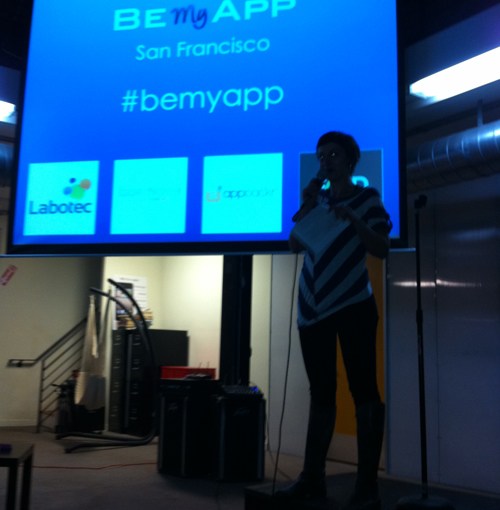
The BeMyApp Competition was held at pariSoma’s new building, an innovation “hotspot” and office space in San Francisco. There, a group of innovators, developers, marketers and entrepreneurs got together to try and create an iPhone application that would change the world in forty-eight hours.

People who registered as innovators submitted their ideas on the BeMyApp site,
and a select group presented at the pariSoma building to the rest of the attendees. After the innovators presented their strictly monitored (only one minute!) pitches, the attendees voted on their favorite idea. To cast a vote, each attendee used poker chips as tokens to represent one vote towards an idea. Innovators with the most chips made it to the next round.

Forty-eight hours later, I returned to judge the submissions. I found the new team members, fully integrated with one another, preparing for the presentation. They were laughing, backing one another up and finalizing their demos for the judging. It was great seeing how quickly the camaraderie developed around the common objective of innovating through apps. It was even more surprising to see how dedicated they were to that objective as a single unit in such a short amount of time. The time was finally here: the five finalists presented their demos and a short summaries of their business objectives.

Next, the other judges and I deliberated backstage to pick the winner. It was tough to essentially choose “losers” in a group of teams that did more in a weekend than many large companies could do in a month, but we made the decision.

In the end, the decision went to a two-person team, a vast difference to the more common three- to five-person teams at the event. Their product, “FilmMe,” allowed users to upload ten- to twenty-second clips that would automatically stitch together to form a single video. YouTube made uploading and distributing video easy, which allowed the common PC user to become a producer. FilmMe took video a step further, solving the complexity and time drain that comes with composing multiple video clips from many sources. The presentation of the concept without the demo left me a bit skeptical about its usefulness, but after seeing their demo I was surprised to discover how entertaining it was to watch a single stream of videos mashed together about “who was your first kiss?” To give an example, think about interviewing a few friends at a birthday party. With one click, FilmMe automatically updates and converts all the videos into a single video you can post to Facebook or YouTube to share. Simple concept? Yes. But a huge time and energy saver. Simply put, with FilmMe I would try my hand in compiling and sharing short clips from a night out. However, I will—and have—avoided at any cost the effort it would take to copy videos from my phone, request clips from friends, load them into iMovie and render them into a single movie just for the sake of sharing.

All in all, it was inspiring to be a part of the BeMyApp competition. It reminded me that losing red tape and doing away with corporate structure can allow for true innovation to occur and that forty-eight hours is all one needs to turn an idea into a working reality. All it takes is a few like-minded entrepreneurs to get together with a common purpose. I will certainly take what I saw at the event back to my company and encourage more adhoc, fun, innovative sessions like these for my team.


pariSoma’s New Digs